
Four Free GEO Tools: Audit, Fix Schema, Ship llms.txt, Track Citations
Four free browser tools take an AI visibility program from audit to baseline: score your foundation, fix JSON-LD attribution, publish an honest llms.txt, and build a citation-tracking query set.
The GEO Compass tools are four free, browser-only utilities for starting an AI visibility program: a 25-question scorecard to audit your foundation, a JSON-LD schema validator tuned for AI engines, an llms.txt generator, and a query-set builder for citation tracking. Used in that order, they take you from "we have no idea where we stand" to a written baseline in an afternoon. Nothing you type leaves the browser, and none of them asks for an email.
This guide runs the four as one workflow: audit, fix structure, publish llms.txt (with an honest caveat), then start tracking. Each step shows the tool in use with harmless sample inputs, then explains what the output does and does not tell you.
Why a workflow, not four separate tools
The most common mistake in generative engine optimization (GEO: getting your pages cited inside AI answers) is starting at the top of the stack. A team buys a tracking dashboard first. Then it watches a number move and cannot explain why, because nobody checked whether the site was readable in the first place.
The order matters because each layer depends on the one below it. AI engines have to be able to fetch your pages before structure matters. Structure has to be clean before measurement means anything. And measurement only helps if the query set reflects how your buyers actually ask.
That is the sequence the tools follow. Do the cheap structural work first, then spend measurement effort on a site that deserves to be measured.
Step 1: Audit with the AI Visibility Scorecard
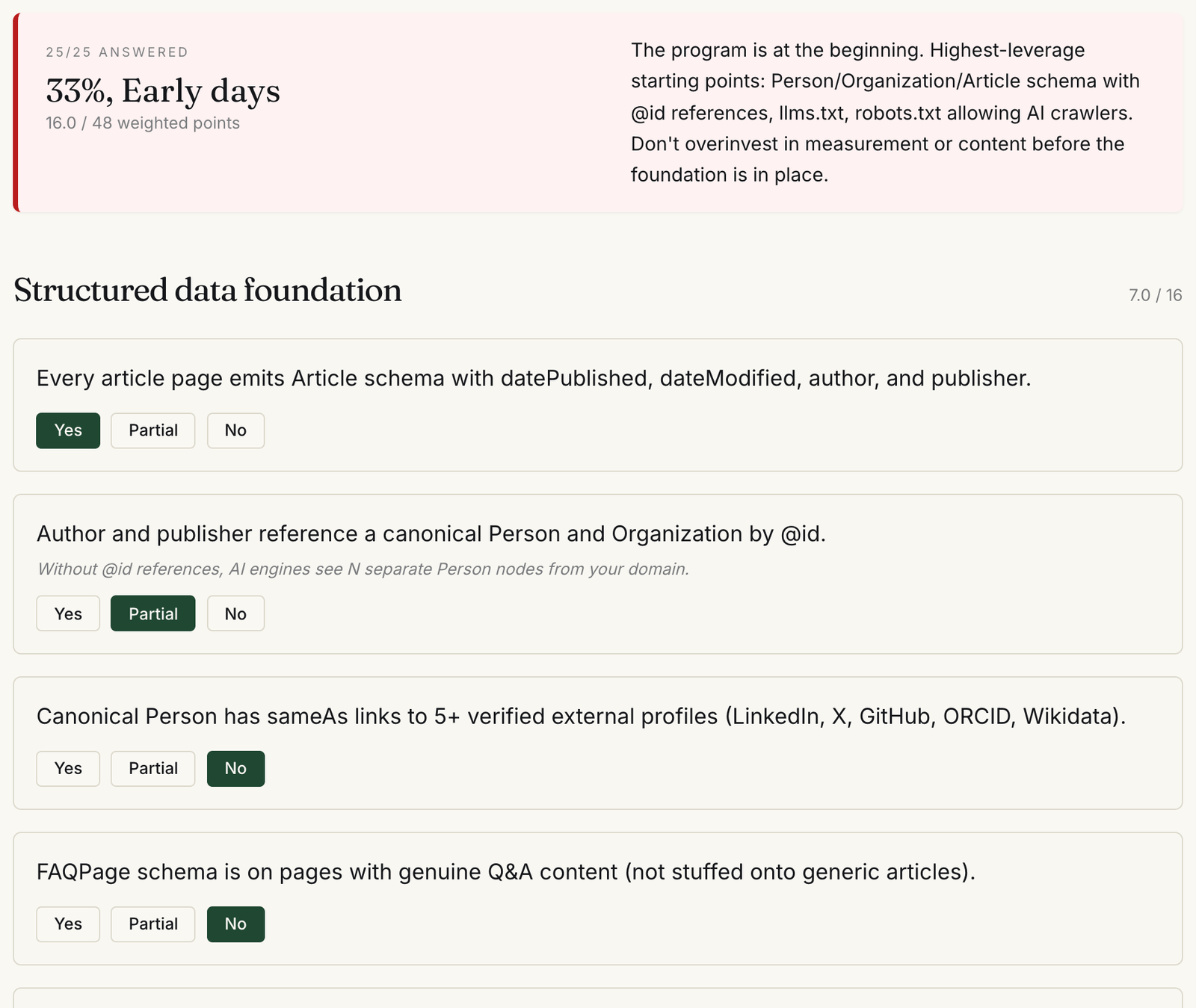
The AI Visibility Scorecard is a self-assessment. It asks 25 yes, partial, or no questions across five categories: structured data foundation, content patterns, crawler access, measurement, and governance. Each question carries a weight of 1 to 3, for 48 weighted points in total.
How to use it
- Open the scorecard and answer each question for your site as it is today, not as it will be after next sprint.
- Use "Partial" honestly. It scores half the weight, so it is the right answer when Article schema exists on some templates but not others.
- Watch the sticky score bar at the top. Once all 25 are answered, it shows a tier and a short recommendation.
- Note the per-category score next to each heading. That breakdown is more useful than the headline percentage.
Reading the result
The tiers are fixed thresholds: 80% and above is "Strong foundation", 60% "Solid mid-tier", 40% "Foundation in progress", and below that "Early days". Below 40%, the tool tells you to fix schema, crawler access, and llms.txt before investing in content or measurement. I agree with the first two and would rank llms.txt well below them, for reasons covered in step 3.
The honest limit: this is a self-report. It measures whether you believe your foundation is in place, not whether it is. Two people on the same team can score the same site 20 points apart. Treat a "Yes" on crawler access as a claim to verify, not a fact. In my view, crawler access is where self-assessments are most often wrong, because a CDN or WAF rule can block AI bots without the content team ever knowing. I wrote about that failure mode in You Can Do Everything Right and Still Be Invisible.
Step 2: Fix structure with the Schema validator
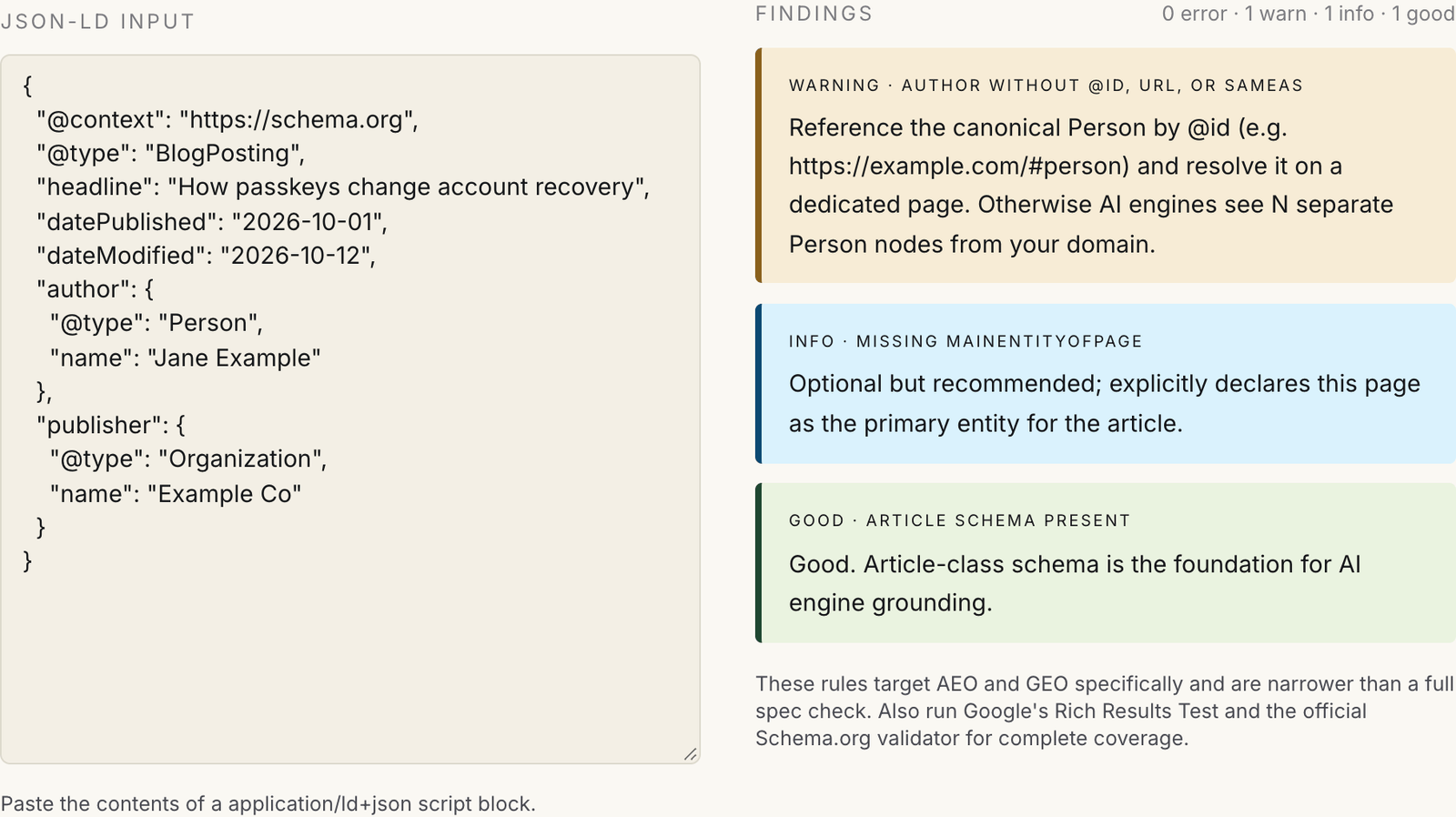
If the scorecard flagged structured data, the Schema validator is the next stop. You paste a JSON-LD block and it returns findings graded as error, warning, info, or good. It is not a general schema.org validator. It checks a narrow set of things that matter for attribution. Does the article have dateModified? Is the author a Person? Is that Person tied to a stable identity through @id, url, or sameAs?
How to use it
- Open one of your article pages, view source, and find the application/ld+json script block.
- Copy its contents and paste them into the input box. Findings update as you type.
- Fix every error first, then the warnings. Re-paste after each change to confirm it cleared.
- Repeat on one page per template (article, product, glossary), not on every URL.
Reading the result
The warning I would fix first is the one in the screenshot: an author with only a name. An author string is ambiguous across the web. An author that points to a canonical Person node, with sameAs links to profiles you control, is something a machine can resolve. In identity work, this is the same problem as account linking: a name is an attribute, an identifier is a key.
The validator also flags FAQPage markup with a single question, HowTo without steps, and entities carrying more than three types. Those are "schema that lies" patterns. They are worth removing even though nothing breaks, because markup that misdescribes a page is a trust problem.
Three honest limits. First, it reads only top-level objects. If your site emits one @graph block, copy a single node out, add the @context line, and paste it alone, or you will see errors that do not apply. Second, it does not fetch your page, so it cannot tell you whether the markup matches the visible content. Third, Google is clear that you do not need to create special markup to appear in its AI features: its AI optimization guide says so directly. I treat schema as entity hygiene, not a ranking lever. Run Google's Rich Results Test and the Schema.org validator alongside it for syntax and eligibility.
One more calibration point on FAQPage. Since August 2023, Google has shown FAQ rich results only for well-known, authoritative government and health websites. Keep FAQPage where the Q&A is genuine, but do not expect a rich result from it. For which types are worth the effort on technical content, see my piece on schema markup for security content.
Step 3: Publish llms.txt, with eyes open
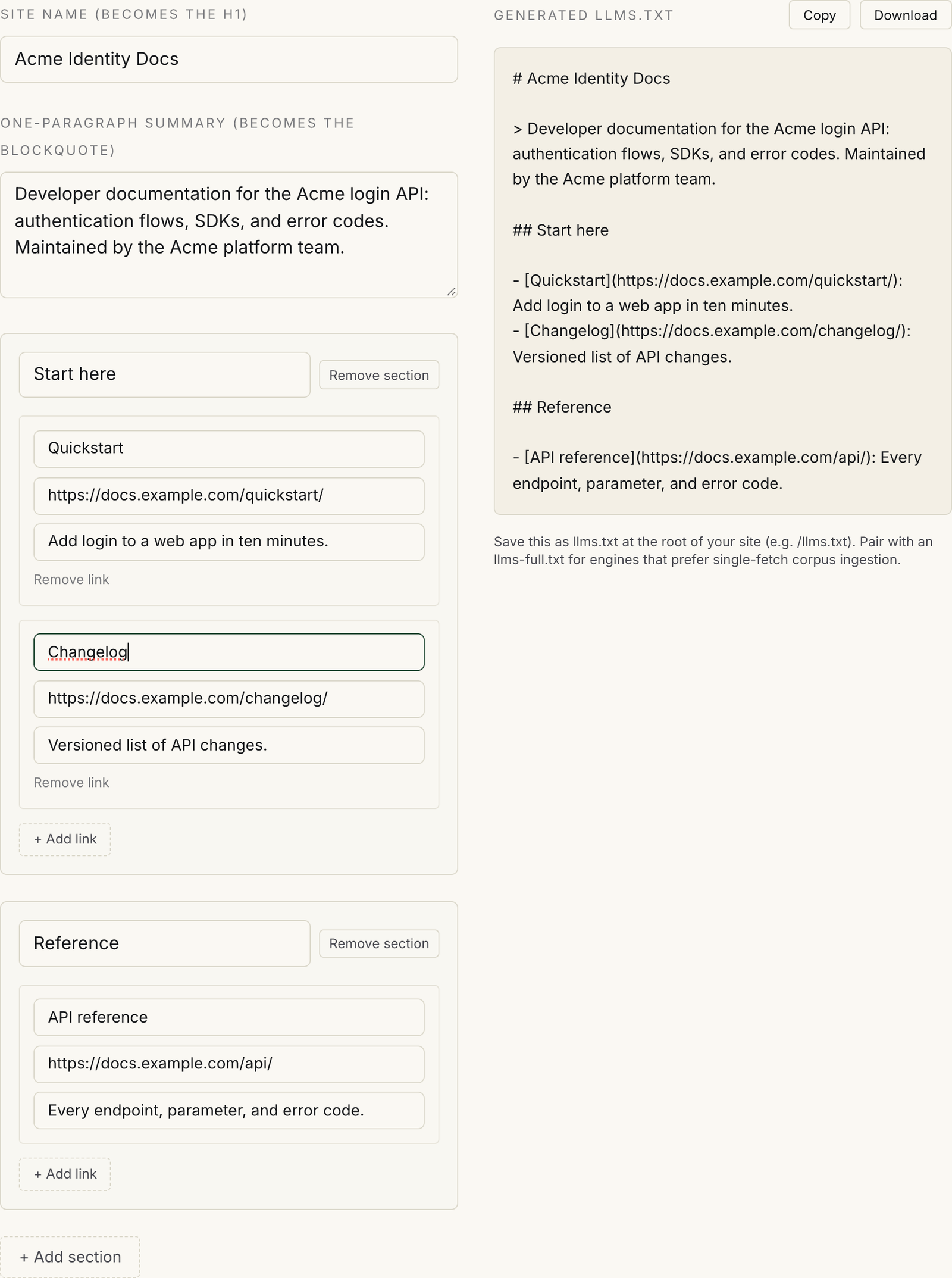
The llms.txt generator builds the file from a form. You enter a site name (the H1), a one-paragraph summary (the blockquote), and sections of links with optional one-line descriptions. The output updates live, and you can copy it or download it as llms.txt.
Be clear on what llms.txt is before you ship one. It is a proposal, published by Jeremy Howard in September 2024 at llmstxt.org, for a Markdown file that gives agents a curated map of a site. It is not a standard, and major AI search engines have not confirmed that they use it to choose what to cite. Google's AI optimization guide states that Google Search ignores llms.txt files, and that keeping one will neither harm nor help your visibility.
So why include the step? Because the file is cheap, and its real audience is agents reading documentation. Coding assistants that fetch API docs while a developer works benefit from a clean index of the right pages. If you run developer docs or an API product, ship one. If your goal is Google visibility, it is optional, and you should never pay anyone to write it. I made the full case in llms.txt Is the Meta Keywords of 2026.
How to use it
- Replace the sample site name and summary with your own. Keep the summary factual: what the site covers and who maintains it.
- Rename the first section to something like "Start here" and add the three to five pages an agent should read first.
- Add a second section for reference material. Use the description field; a link with no context is less useful to an agent.
- Copy or download the output and publish it at /llms.txt, or at a subpath such as /docs/llms.txt if it only covers your docs.
Reading the result
The output follows the proposal's shape: an H1 (the only required element), a blockquote summary, and H2 sections of Markdown links. What the generator cannot do is pick your pages. That editorial choice is the whole value of the file. Listing 400 URLs recreates your sitemap and defeats the purpose.
Two smaller notes. The proposal reserves a section named "Optional" for links an agent can skip; the generator has no special handling for it, so name a section "Optional" yourself if you want one. And the hint under the output mentions pairing the file with llms-full.txt. That is a reasonable convenience for docs-heavy sites, not a visibility requirement.
Step 4: Start tracking with the Citation Tracker Quickstart
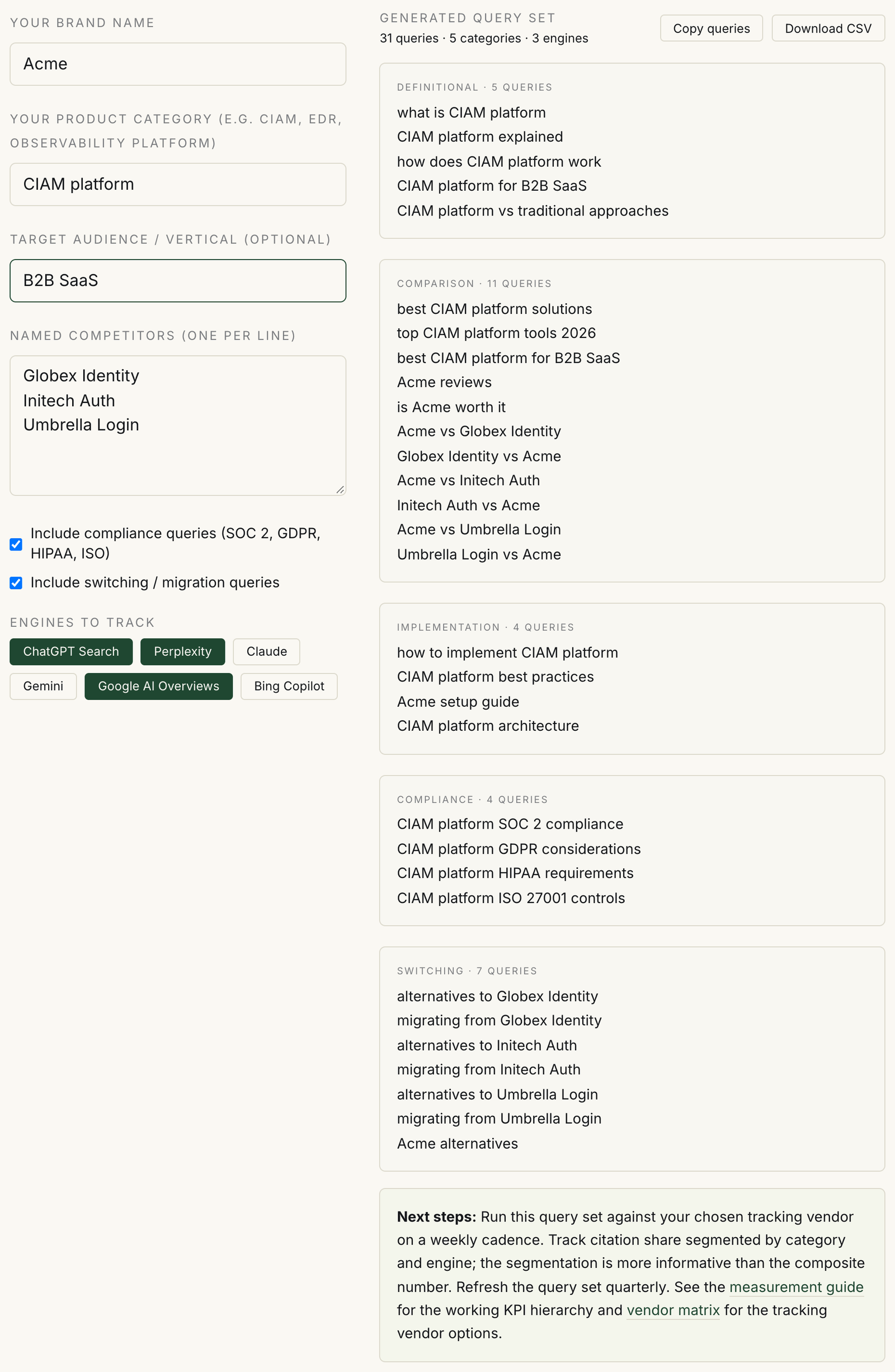
The Citation Tracker Quickstart builds a starter query set for measuring how often AI engines cite you. You enter your brand, your product category, an optional audience, and named competitors. It returns grouped queries you can copy or download as CSV for whatever tracking tool or script you use.
How to use it
- Enter your brand and the category name buyers use, not your internal product name.
- Add an audience if you sell to a vertical. It adds "for [audience]" variants to the definitional and comparison groups.
- List up to four competitors. Each one adds two head-to-head queries, one in each direction.
- Leave the compliance and switching boxes on if those questions come up in your sales cycle, then download the CSV.
Reading the result
The output is a template, and you should edit it before running it. Some generated queries will read awkwardly for your category, such as "how does CIAM platform work". Rewrite those the way a buyer would type them. The comparison list hard-codes the current year, so update it when the year changes. The engine toggles record which engines you plan to track; they do not change the queries.
The tool also does not run anything. It does not query ChatGPT, Perplexity, or Google AI Overviews, and it reports no citation data. You still need a tracker. The tool page lists vendor options, one of which is GrackerAI, the company I founded. A spreadsheet and a weekly manual run also works at small scale.
Then expect noise. GrackerAI's production tracking stores roughly 180,000 responses per customer per quarter across four engines. In that data, ChatGPT and Perplexity cited the same domains only about 11% of the time for identical queries. The details are in How LLMs Drift. One run is an anecdote. Track the same set on a fixed cadence, segment by engine and query group, and read trends, not single numbers. The measuring AI visibility guide on GEO Compass covers the KPI side.
What to do after the first pass
Rescore the scorecard once the structural fixes ship, and keep the first result for comparison. Re-validate one page per template whenever a CMS or theme change touches the page head. Refresh the query set quarterly, because the way buyers ask questions changes as categories mature.
My view, after years of building identity infrastructure: most of this is plumbing. The scorecard, schema, and query set are prerequisites, not strategy. They make sure your content can be read, attributed, and measured. Whether it gets cited still depends on whether it is the best answer to the question. These four tools make sure that, when it is, nothing in the plumbing is in the way.
FAQ
Are the GEO Compass tools free, and do they store my data?
Yes, all four are free with no sign-up. They run client-side in your browser. The scorecard answers, pasted JSON-LD, llms.txt fields, and brand inputs are not sent to a server.
Does publishing llms.txt get my site cited by ChatGPT or Google?
There is no public evidence that it does. llms.txt is a proposed convention, and major AI search engines have not confirmed they use it for citation decisions. Google says its Search ignores the file. Its practical value is helping agents navigate developer documentation.
Can the schema validator replace Google's Rich Results Test?
No. It checks a narrow set of attribution and freshness issues and reads only top-level JSON-LD objects. Use it alongside the Rich Results Test and the Schema.org validator, which check syntax and eligibility.
What is a good score on the AI Visibility Scorecard?
80% or above is the tool's top tier. The category breakdown matters more than the total. A site at 70% with zero crawler access points has a more urgent problem than a site at 55% with gaps only in governance.
How many queries should a citation tracking set have?
The quickstart produces 12 to 33 depending on inputs, which is a starting point. The scorecard's own measurement question asks whether your set has 100 or more queries segmented by query type. Grow the set from your sales calls and search console data.
More like this
All GEO & AI Search- GEO & AI Search10 Lessons From Tracking 50,000 AI Citations Across 6 EnginesOver 90 days I tracked how six AI search engines cite sources across 50,000+ B2B software responses. The data broke several assumptions…
- GEO & AI SearchHow to Check Your AEO and GEO Visibility for Free (Tools and Chrome Extensions That Actually Work in 2026)You can check whether ChatGPT, Perplexity, Gemini, and Google AI Overviews mention your brand for free, in your browser, in about a…
- GEO & AI SearchAI Search Is Becoming the Default for How B2B Companies Find and Compare ProductsTraditional impressions on our properties fell 10-20% this year. AI search visibility rose 35%. That inversion is not a problem to fix;…
Get new GEO & AI Search writing
Enjoyed this? Subscribe and tell us what you read most. GEO & AI Search is already ticked for you. No tracking pixels, unsubscribe with one click.