
How to Choose and Roll Out Passwordless Authentication: Matrix, Then Checklist
Pick a passwordless method per user group with the selection matrix, then ship it with the four-phase implementation checklist. Here is how to use both, grounded in NIST SP 800-63B-4 and WebAuthn Level 3.
Choosing a passwordless method and shipping it are two separate problems, and most projects stall because they treat them as one. The passwordless authentication selection matrix answers the first: which method, for which users. The passwordless authentication implementation checklist answers the second: how to roll it out without locking people out. Use them in that order, one population at a time.
This guide walks through both pages as a single path. You will come out with a primary and a backup method for each user group, a recovery design, a four-phase rollout plan, and a short list of numbers that tell you whether it worked.
What the two pages are
The selection matrix compares five realistic methods: synced passkeys, device-bound FIDO2 security keys, push approval, magic links, and email or SMS one-time codes. It scores them against eleven common scenarios, lists a feature-by-feature comparison, prices the parts that have a public price, and ends with recommended pairings.
The implementation checklist is the execution plan. It opens with four decisions you settle before any work starts, then runs through assessment, planning, pilot, and rollout, followed by monthly, quarterly, and annual reviews. It closes with a metrics table and the five mistakes that derail these projects.
Both are free, need no signup, and were last checked against the current standards in September 2026.
Why the choice matters more in 2026
Three standards changes make an older passwordless plan worth revisiting.
First, NIST finalised SP 800-63B-4 (the US federal guideline for authentication assurance levels, or AALs) in July 2025. Under section 2.2.2, verifiers "SHALL offer at least one phishing-resistant authentication option at AAL2". Under section 2.3.2, syncable authenticators "SHALL NOT be used at AAL3". Those two sentences explain most of the matrix: passkeys for the many, hardware keys for the few.
Second, the same document says email "SHALL NOT be used for out-of-band authentication" (section 3.1.3.1), and it classes SMS and voice delivery as restricted. That matters when you choose a backup method, which I come back to below.
Third, WebAuthn Level 3, the W3C browser API behind passkeys, became a W3C Recommendation on 25 August 2026. The API you build against is now stable. I covered the feature changes in WebAuthn Level 3: what is new in the passkey standard.
Adoption has caught up with the standards. The FIDO Alliance's State of Passkeys 2026 report estimates 5 billion passkeys in use. In its survey, 75% of consumers had enabled a passkey on at least one account, and 68% of organisations had deployed or were deploying passkeys for employee sign-in. Those are survey figures from a standards body that promotes passkeys, so read the direction as solid and the decimals as soft.
Step 1: Use the matrix to choose a method
Start with your populations, not the methods
The first mistake I see in passwordless planning is picking a method for "the users." There is no such group. A consumer product has customers, support agents, and administrators. A workforce rollout has office staff, frontline staff without a company phone, contractors on unmanaged laptops, and admins. Each needs its own answer.
So before you open the matrix, write your populations down. Then read the Quick decision guide one row at a time.
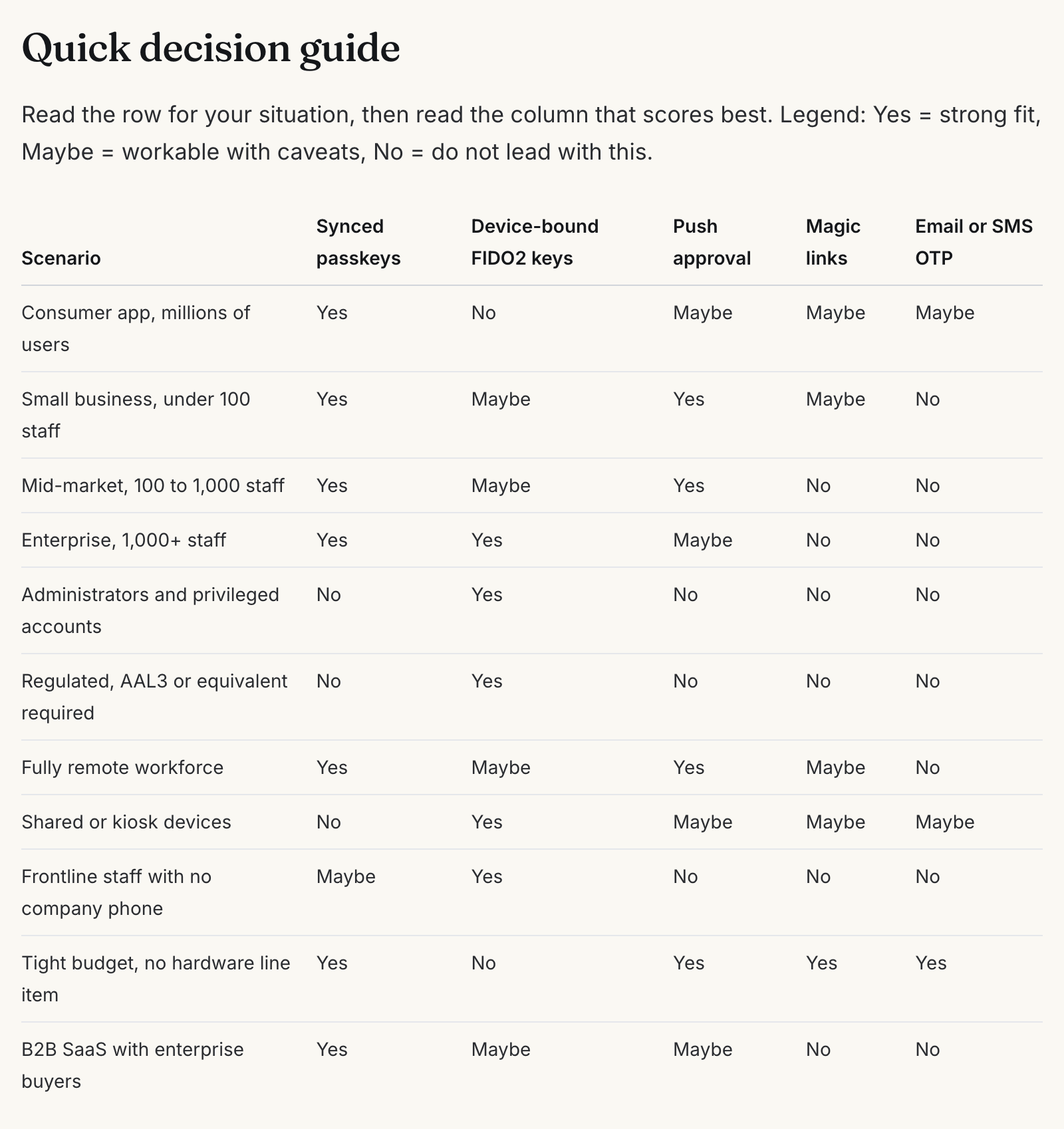
Read the No cells before the Yes cells
The Yes cells tell you what fits. The No cells tell you what will hurt you, and they are more decisive. Two rows do most of the work.
- Administrators and privileged accounts score No on everything except device-bound FIDO2 keys. If you only remember one row, remember this one.
- Regulated, AAL3 or equivalent required has the same shape, for the reason NIST gives: a synced passkey's private key is exportable by design.
If a contract or regulator pins any group to AAL3, that group gets hardware. The rest of the decision is about cost and user experience, not compliance.
Then check the edge rows. "Shared or kiosk devices" and "Frontline staff with no company phone" both rule out push approval and lean on hardware keys. These are the groups that quietly stall a rollout at partial adoption if nobody plans for them.
Use the method sections to test your shortlist
Below the decision guide, each of the five methods gets a short profile: best for, advantages, disadvantages, and a rollout-effort estimate. Read the disadvantages of your top pick, not just its strengths.
For synced passkeys, the trade-off is that your security partly depends on the user's Apple or Google account. For magic links, the account is only as safe as the mailbox. The magic link security guide covers the token-handling problems behind that row in more depth.
The Feature comparison matrix is where you settle close calls. The rows I would weight most are "Resists adversary-in-the-middle proxy" and "Survives device loss without helpdesk." The first decides whether a phishing kit still works. The second decides who pays for every lost phone.
Pick a primary and a designed backup for every population
The matrix ends with a pairings table, and this is the output you take into the checklist.
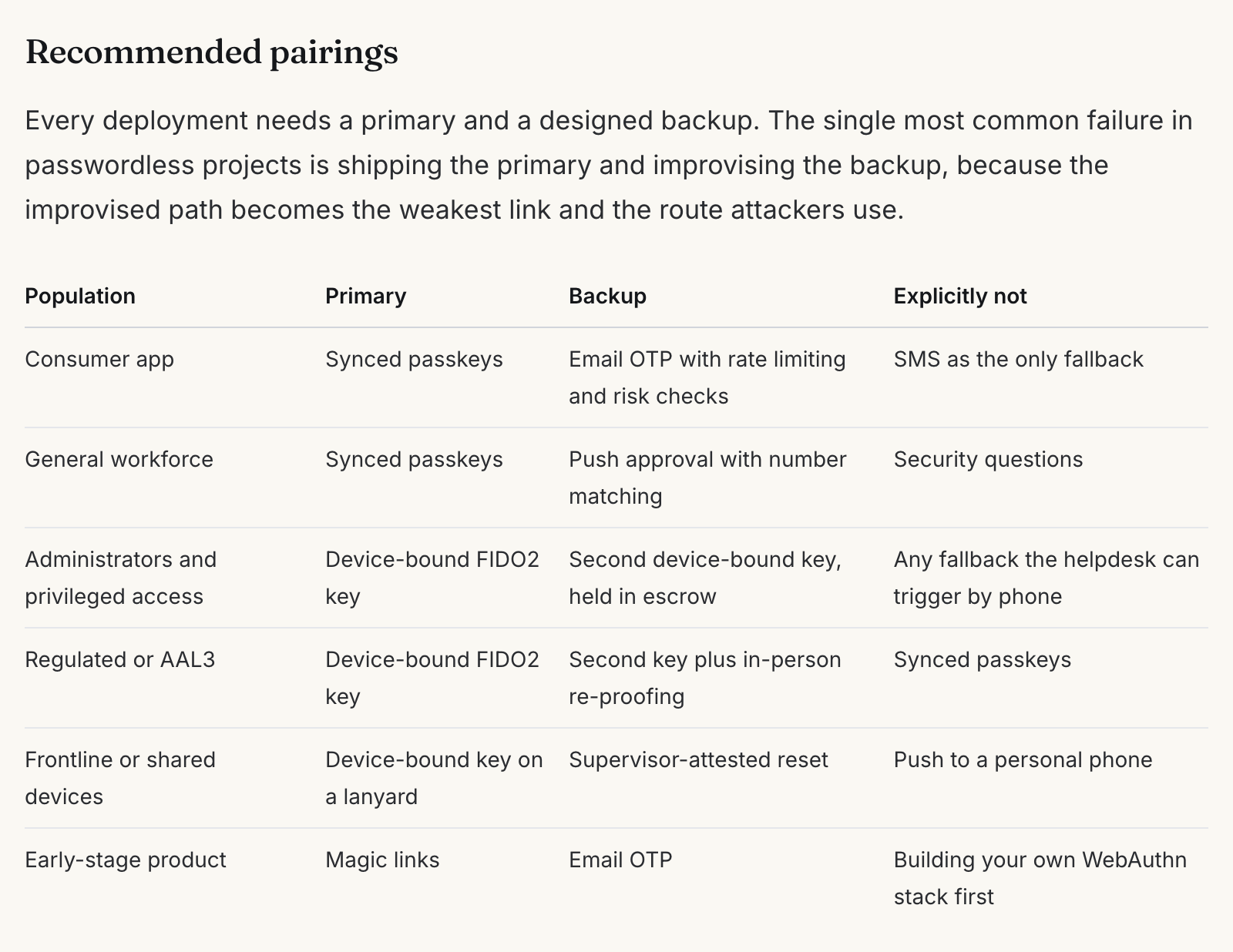
The third column, "Explicitly not," is the useful one. Writing down what you rejected, and why, stops the decision being reopened every quarter. It also stops the helpdesk inventing a fallback under pressure.
A practitioner caveat on the consumer row. The matrix pairs synced passkeys with email OTP as the backup. That is a common and pragmatic choice for consumer products. It is not an NIST-recognised authenticator, though, because SP 800-63B-4 excludes email from out-of-band authentication. If you need to claim an assurance level, treat email as a recovery channel you harden, not as a second factor that counts.
Price only what has a public price
The Cost model section separates published list prices (security keys, email and SMS rate cards, one CIAM platform's pricing) from the things that have no public benchmark: integration effort and support load. Keep that separation in your own business case. Estimate the second group in engineer-days and helpdesk-hours at your own rates rather than borrowing a vendor's headline figure.
Step 2: Work the checklist phase by phase
Once each population has a primary and a backup, switch to the implementation checklist. Before Phase 1, settle its four opening decisions: scope (workforce, customers, or both), assurance obligation, build or buy, and the rollback path. Every later task inherits them.
Phase 1: Assessment (weeks 1 to 2)
The most valuable item here is the baseline. Count password-related helpdesk tickets for the last three months, split by category, and pull your account takeover and credential-stuffing numbers. You cannot add a baseline after the fact, and without one you cannot prove the project worked.
The other item I would not skip is the hard-populations list. The checklist names them: frontline staff without a company phone, shared devices, contractors on unmanaged machines, regions with poor SMS delivery, and users who cannot complete a biometric enrolment. Finding these groups in week two is cheap. Finding them in month four is what stalls programmes.
Phase 2: Planning (weeks 3 to 4), recovery first
Phase 2 covers vendor selection, implementation strategy, and risk management. The section that deserves the most time is recovery design.
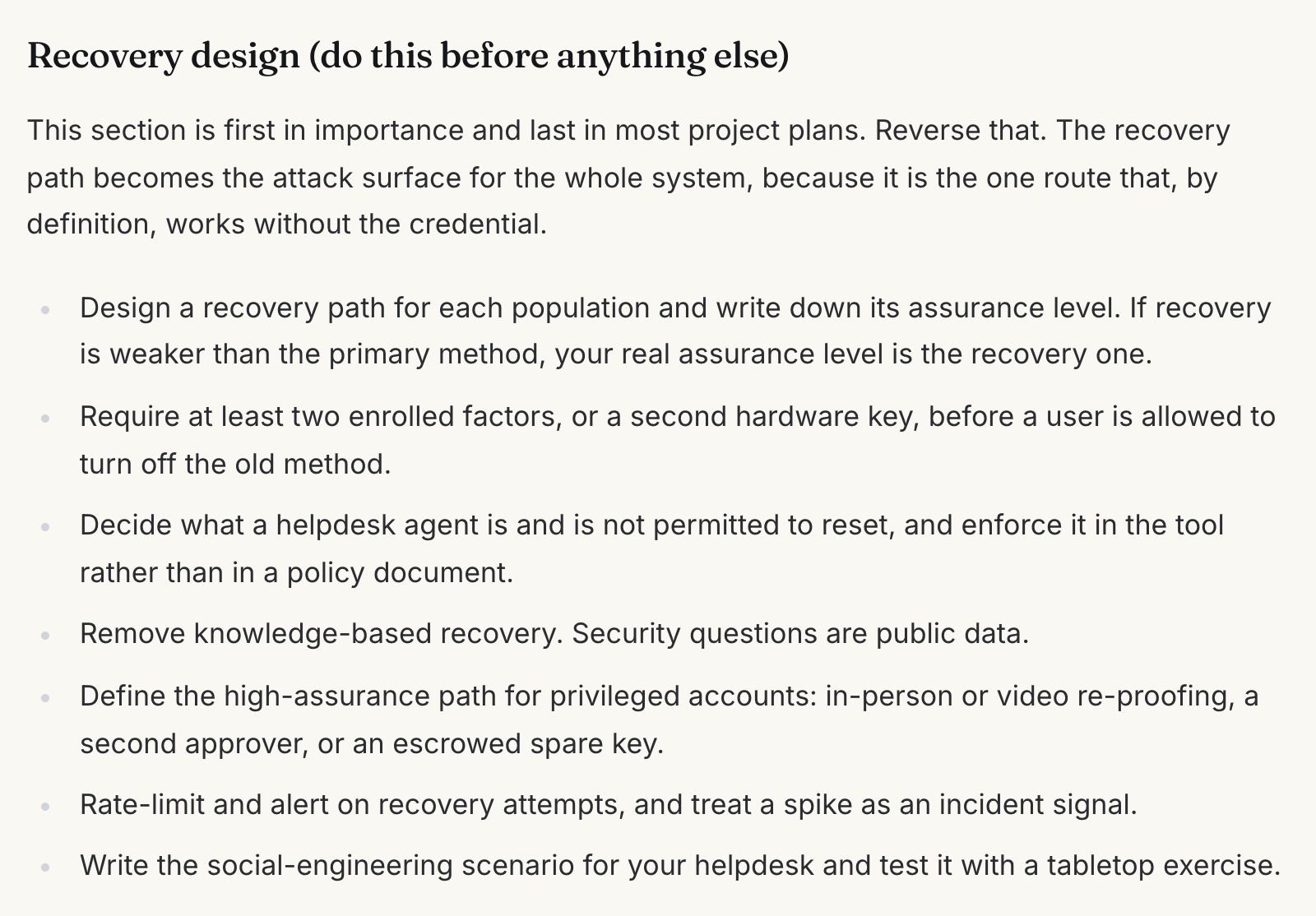
In identity, the failure I see most often is a strong login with a weak way back in. Recovery is the one route that works without the credential, so it sets your real assurance level. If recovery is a helpdesk agent resetting an account after a phone call, your phishing-resistant passkey is only as strong as that call. I made the full argument in account recovery design sets your real security ceiling.
Two checklist items carry most of the weight. Require two enrolled credentials, or a second hardware key, before a user can turn off the old method. And enforce what the helpdesk may reset inside the tool, not in a policy document.
On vendor selection, confirm support for conditional UI. That is the WebAuthn feature, called conditional mediation in the specification, that offers a saved passkey in the browser's autofill. Also confirm you can require device-bound credentials for the privileged population, and ask about the data export path before you sign.
Phase 3: Pilot (month 2)
Instrument before launch: enrolment funnel, authentication success rate, time to authenticate, and fallback usage. Run the new method alongside the old one, never instead of it. Then deliberately break things. The checklist asks you to have at least one pilot user delete their credential on purpose, so recovery is tested by a real person and not just a test script.
Pick a pilot group that will complain precisely. Polite pilots produce clean reports and a broken rollout.
Phase 4: Rollout (months 3 to 6)
Roll out department by department, from the most capable to the hardest, with the old method still available underneath. Publish a deprecation date for the old method. Pause any wave that goes sideways rather than pushing through.
The post-deployment step that is skipped most often is confirming no password endpoint is still reachable. A hidden login button is not a disabled endpoint. Check at the API layer, or the attack you set out to remove survives the project.
After that, the ongoing reviews take over. The quarterly audit of privileged accounts matters most, because admin exceptions granted during rollout tend to become permanent.
How to tell whether it worked
The checklist's metrics table separates the four numbers that predict success from the ones that only describe it.
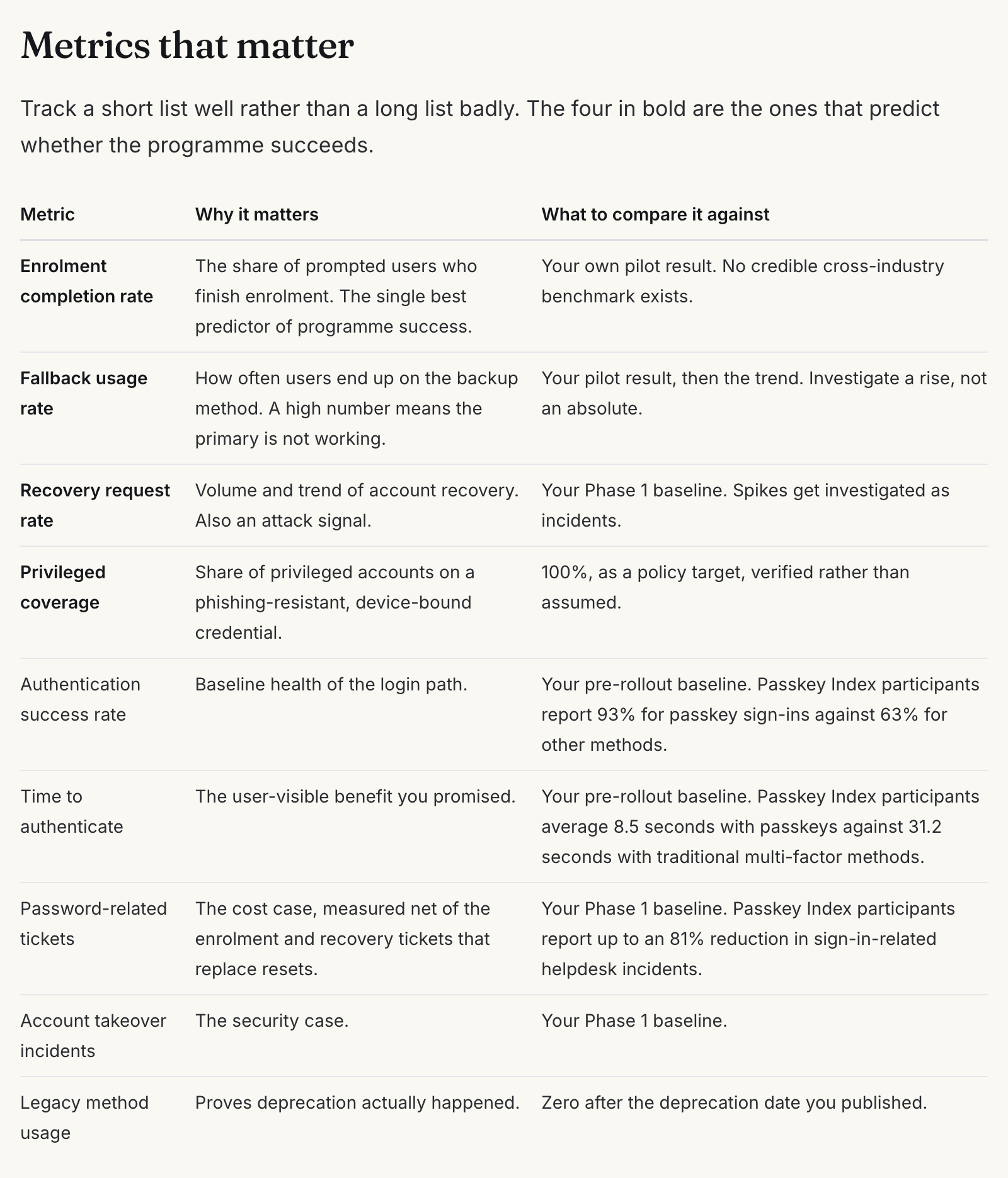
Enrolment completion is the one teams underrate. Passkeys work well once enrolled. The FIDO Alliance's Passkey Index reports a 93% sign-in success rate for passkeys against 63% for other methods, and 8.5 seconds per sign-in against 31.2. Those comparisons are with email verification, SMS codes, and social login, self-reported by nine large consumer services. Getting users to enrol is the hard part, which is the gap I wrote about in passkeys have a 93% success rate, but few accounts enroll.
Fallback usage is the honest signal. If many users end up on the backup, the primary is not working, whatever the satisfaction survey says.
What these pages cannot tell you
- They are a standards and documentation review, not a lab test. Both pages say so. The rollout-effort ranges and phase durations are planning estimates, not measured averages.
- They cannot score your vendor. The matrix compares methods. For platforms, see the enterprise passkey migration decision framework on device-bound versus synced choices, then test vendors against your own identity data.
- They cannot give you an enrolment benchmark. No credible cross-industry figure exists. Your pilot result is the benchmark.
- The cost section prices one provider per line. Your rate cards will differ, so re-run the arithmetic with your own numbers.
Start with the selection matrix and your population list. When every group has a primary, a backup, and an "explicitly not," move to the checklist and begin with the baseline.
FAQ
Which passwordless method should most organisations start with?
Synced passkeys for consumers and the general workforce, and device-bound FIDO2 security keys for administrators and anyone with an AAL3 obligation. NIST SP 800-63B-4 rules synced passkeys out at AAL3, which is why most organisations end up running both.
Do magic links and email codes count as passwordless?
They remove the password, so technically yes. They are not phishing resistant, and the account becomes only as secure as the mailbox. NIST SP 800-63B-4 does not accept email for out-of-band authentication, so use them for low-risk products or as a hardened recovery channel.
How long does a passwordless rollout take?
The checklist plans for about six months from assessment to a completed departmental rollout, with the pilot in month two. Hardware key programmes take longer because of procurement and distribution. Recovery design and legacy applications usually set the pace, not user count.
Should we turn off passwords on day one?
No. Run both paths during rollout, require two enrolled credentials per user, then remove the password path on a published deprecation date. Confirm at the API layer that the old endpoint is actually gone.
More like this
All Identity & CIAM- Identity & CIAMThe Complete Guide to Authentication Implementation for Modern ApplicationsProduction authentication patterns for OAuth 2.0, OIDC, JWT, SAML, and WebAuthn, including the build-versus-buy maths and the storage…
- Identity & CIAMPasswordless Authentication in 2026: 5 Methods Compared and How to Roll It OutPasswords are responsible for 80% of data breaches. Passwordless authentication eliminates the attack surface entirely.
- Identity & CIAMSilent Network Authentication: The Invisible Layer Replacing SMS OTP in 2026Silent Network Authentication verifies users in 1-4 seconds using SIM cryptography without any user action.
Get new Identity & CIAM writing
Enjoyed this? Subscribe and tell us what you read most. Identity & CIAM is already ticked for you. No tracking pixels, unsubscribe with one click.