
How Much of You Is on Data Broker Sites? A Free Exposure Check
Data brokers hold a profile of nearly every US adult. This free, browser-only check estimates how exposed you are and gives you an opt-out plan, with nothing leaving your device.
If you are a US adult, a profile of you almost certainly sits on people-search and data broker sites today: your name, age, current and past addresses, phone numbers, and relatives. The Data exposure check estimates how large that profile likely is from eight yes-or-no questions, then hands you a prioritized opt-out plan. It runs entirely in your browser. Nothing you toggle is sent anywhere, and there is no signup.
This guide covers why broker exposure is a security problem and not only a privacy one, how to use the tool, and how to turn its plan into fewer records about you.
What the exposure check does
The tool asks about eight life facts that map to the sources brokers actually harvest. Owning a home puts your deed and tax assessment into public records. Voter registration, a long address history, a stable phone number, a public social profile, an email found in a breach, and findable relatives each add another source.
From your answers it produces three things:
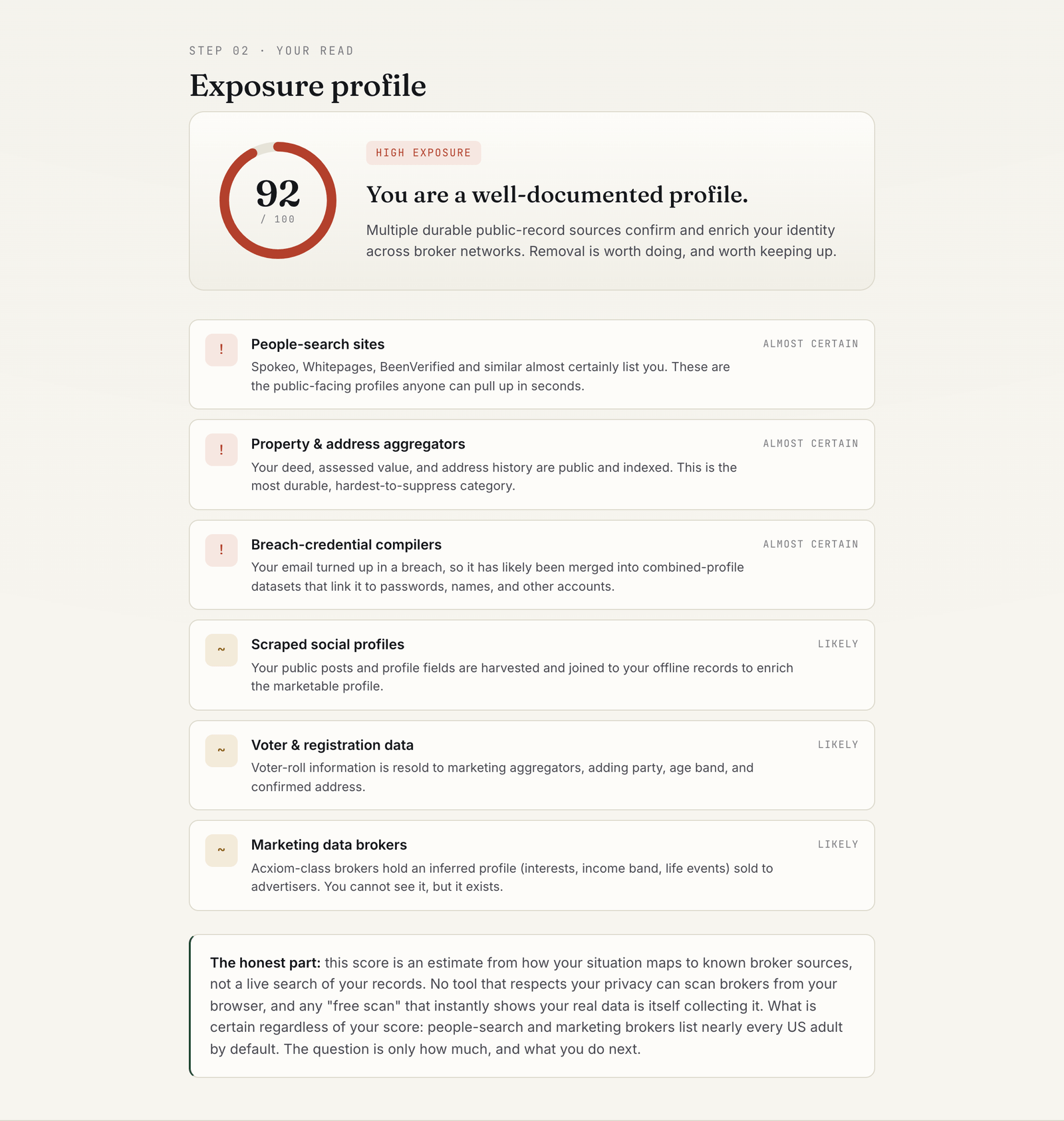
- An exposure score out of 100, with a plain verdict (lower, moderate, or high exposure).
- A list of the record holders that likely carry you, each marked almost certain, likely, or possible.
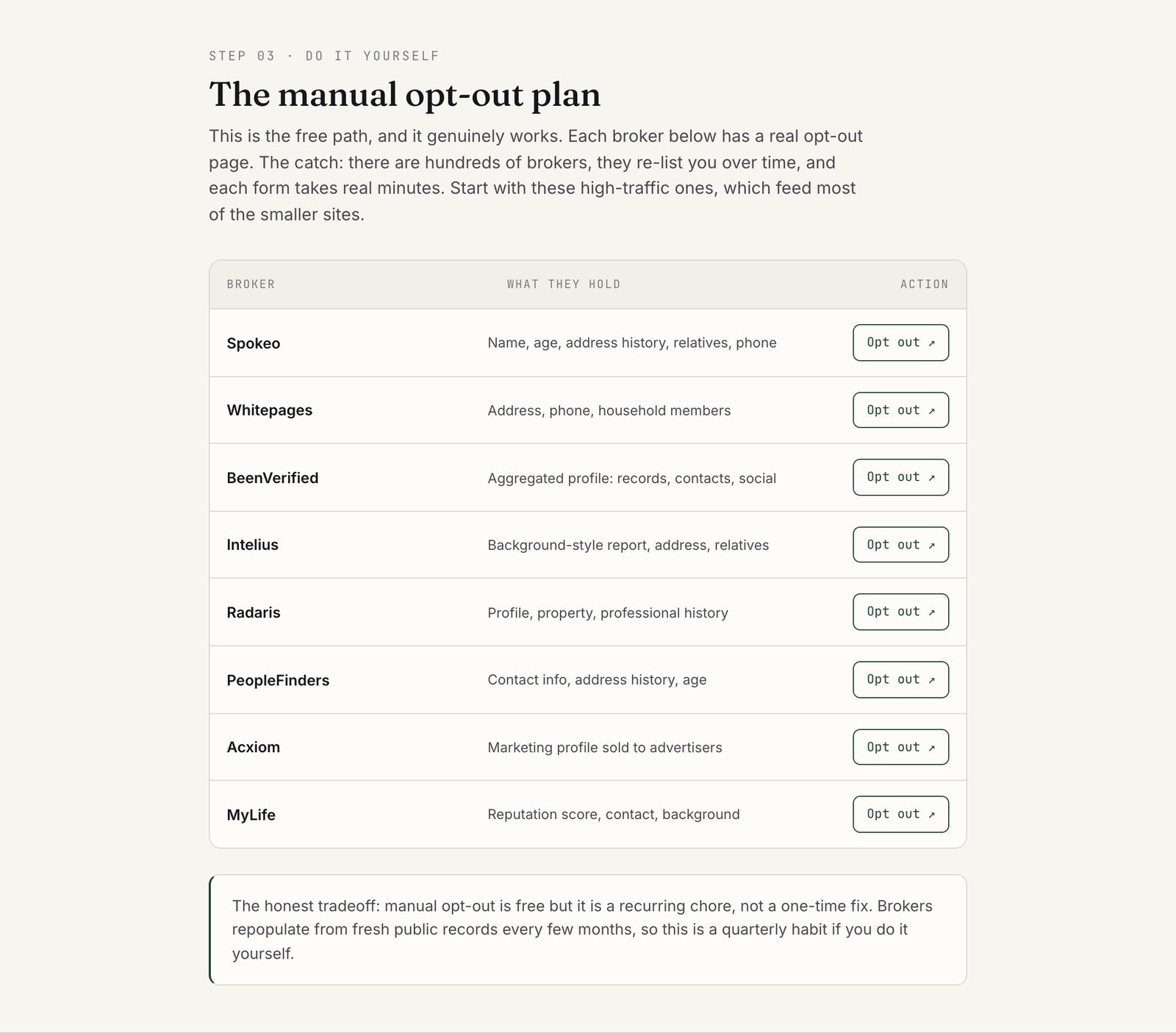
- An opt-out plan: direct links to the opt-out pages of eight high-traffic brokers, plus a comparison of paid removal services if you would rather not do it by hand.
It does not search for your records. That is a deliberate design choice, and I explain below why I think it is the right one.
Why broker exposure is a security problem
Most people file data brokers under "annoying marketing." That framing undersells the risk. A broker profile is a ready-made dossier, and attackers buy convenience like everyone else.
The scale is not in doubt
The Federal Trade Commission studied nine brokers and reported that they collect and store billions of data elements covering nearly every U.S. consumer. One broker alone held more than 1.4 billion consumer transactions and 700 billion data elements. The same release notes this happens "largely without consumers' knowledge." That report is from 2014. Nothing about the market since then suggests it got smaller.
California's broker registry gives a current count. Its deletion platform now routes a single request to more than 600 registered data brokers. Those are only the companies that registered.
Doxxing and physical safety
The worst case is not hypothetical. In July 2020 an armed lawyer posing as a delivery courier went to the home of U.S. District Judge Esther Salas, killed her 20-year-old son Daniel Anderl, and seriously wounded her husband. The federal judiciary reports that he arrived after acquiring her address and photos of her home and vehicles on the internet. Congress responded with the Daniel Anderl Judicial Security and Privacy Act, which restricts data aggregators from reselling federal judges' personal information.
Judges now have that protection. Everyone else is still relying on opt-out forms.
Social engineering
A broker profile makes a pretext call believable. Someone who knows your previous address, your mother's name, and your phone number can sound like you to a call center. They can also sound like your bank to you. The SIM swap pattern starts exactly here: criminals gather personal details, then persuade your mobile carrier to move your number to their SIM. After that, every text message code you rely on goes to them.
Account takeover through knowledge-based answers
This is the part that matters most to me as an identity practitioner. Knowledge-based authentication (KBA) means proving who you are by answering questions about yourself. "What street did you grow up on?" "What was your first car?" Those answers are often exactly what brokers sell.
NIST's current digital identity guideline does not list security questions as an authenticator at all. SP 800-63B also says verifiers and credential service providers "SHALL NOT prompt subscribers to use knowledge-based authentication (KBA)" or security questions when choosing passwords. Plenty of account recovery flows still lean on them. In identity work, the failure I see most often is not a broken login page. It is a recovery path that trusts facts anyone can look up on a people-search site.
How to use the exposure check
The whole thing takes about two minutes. Open the exposure check and work down the page.
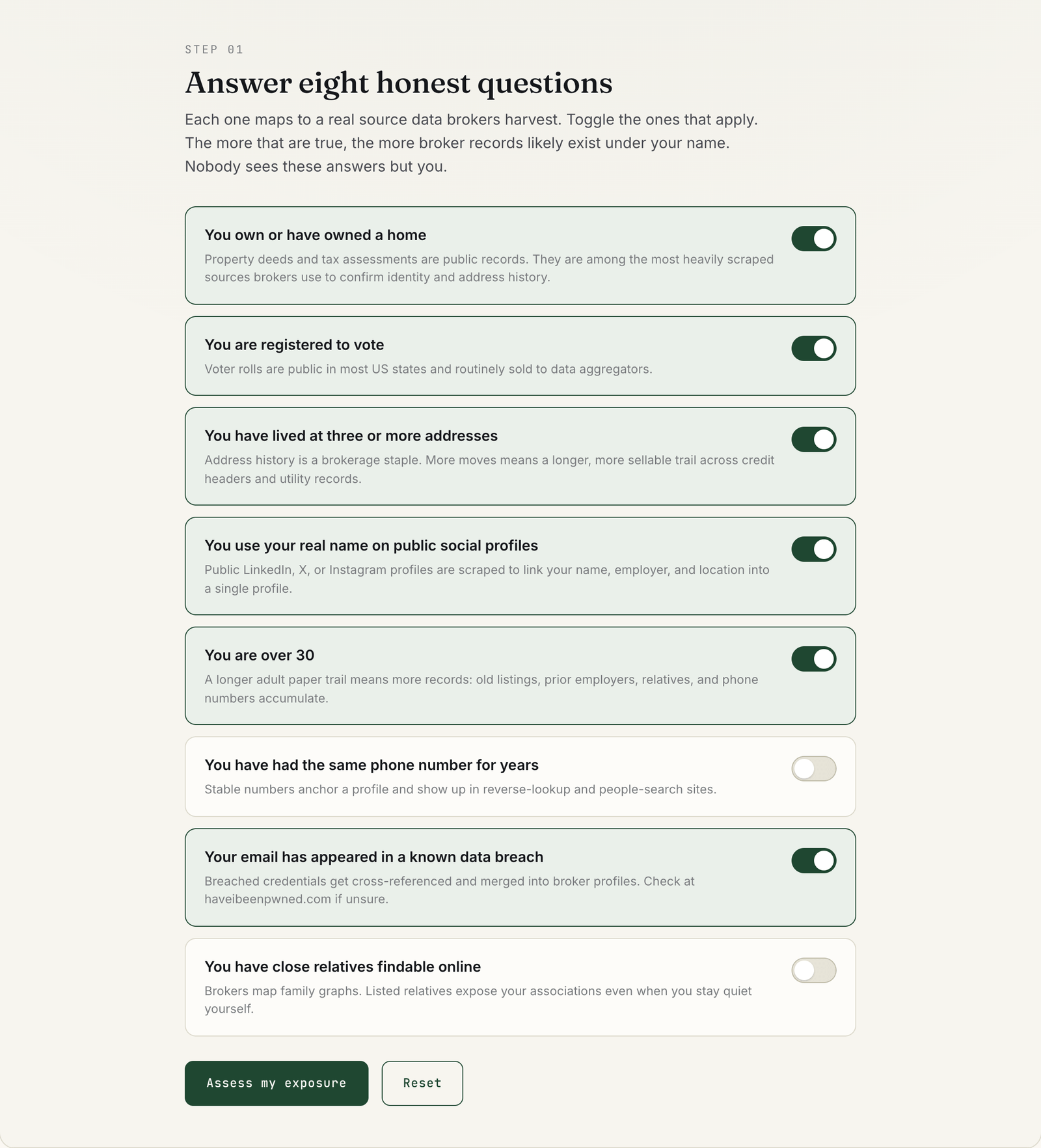
Step 1: Answer the eight questions honestly
Each question is a toggle with a one-line explanation of which broker source it represents. Switch on the ones that are true for you. If you are not sure whether your email has been in a breach, check before you answer. The password breach check on this site covers the password side of that question.
Step 2: Read your exposure profile
Select "Assess my exposure." The tool shows a score, a verdict, and a ranked list of record holders. The sample above lands at 92 out of 100, high exposure. People-search sites, property and address aggregators, and breach-credential compilers come back as almost certain.
Step 3: Work the opt-out plan
Below the profile is the manual plan: eight brokers, what each one holds, and a direct link to its opt-out page. The section after it compares paid removal services for people who would rather pay than repeat the forms.
Reading the score honestly
The score is an estimate, not a measurement. It reflects how many durable sources likely confirm your identity. It does not count your actual listings.
Read the bands this way:
- Lower exposure means fewer durable sources, usually because you rent, have moved rarely, or keep social profiles private. You are still listed. People-search and marketing brokers carry nearly every adult by default.
- Moderate exposure means enough sources line up that a consistent profile exists. Opt-outs will shrink it noticeably.
- High exposure means public records anchor the profile. Property records are the hardest category to suppress, because the underlying government record stays public.
Why not just search for you? Because any tool that shows your real broker records has to send your name and details somewhere to find them. The FTC's own guidance tells you to search for your name on a people search site to begin opting out. That is reasonable advice. But it means the first step of removal is handing a broker a fresh, confirmed query. I prefer a tool that gives you the plan without becoming another collector.
Turning the plan into fewer records
Here is the order I would work in. It puts the highest-leverage actions first.
1. If you live in California, start with DROP
California's Delete Act created the Delete Request and Opt-out Platform (DROP), run by the California Privacy Protection Agency. One verified request goes to every registered broker. It is free, and DROP says your information is used only to complete your request and is not sold or shared. You can also file for another California resident, such as a child or an elderly parent. Start at the official DROP page.
Timing matters. According to the CPPA's broker guidance, brokers have had to access DROP at least once every 45 days since August 1, 2026, subject to limited exceptions in the statute. DROP warns that it can take up to 90 days for your request status to update. I covered the platform's design and why it matters beyond California in a longer analysis of DROP.
DROP only reaches brokers that registered in California, and only residents can use it. Everyone else, and every unregistered site, still needs the manual path.
2. Clear the big people-search sites by hand
Work through the eight brokers in the tool's plan. Do the large people-search sites first, because they are the profiles a stranger reaches in seconds. Keep a simple log: site, date submitted, confirmation email, date verified gone.
Expect two frustrations, both confirmed by the FTC. Your data can reappear when public records change, so you need to recheck. And your information may still appear in the reports of relatives, neighbors, or associates. A quarterly reminder handles the first. Asking close family to opt out too helps with the second.
3. Make the leaked facts useless
You cannot pull every record back. You can stop those records from unlocking your accounts. This step matters more than any single opt-out.
- Retire real answers to security questions. Where a site insists on them, use random answers and store them in your password manager. Your real first street is broker data. A random string is not.
- Add a PIN or passcode to your mobile carrier account. It blocks the call-center step of a SIM swap.
- Move important accounts off SMS codes. An authenticator app or a passkey does not travel with your phone number.
- Treat unexpected calls that recite your details as suspicious. Knowing your address proves only that the caller bought a profile.
4. Decide whether to pay for removal
Paid services repeat the opt-outs across far more brokers than you will reach by hand. Whether that is worth a subscription depends on your score and your time. The tool's comparison section covers the main options, and that page carries its own disclosure about affiliate links. Before you sign up for any service, ask the three questions the FTC suggests. How many sites does it cover? Will it report which sites it opted you out of? How often does it rescan and remove information that reappears?
What this tool cannot tell you
Be clear about the limits before you act on the number.
- It cannot see your actual listings. It estimates from the sources your situation maps to.
- It is US-centric. The questions and brokers reflect US public records and US people-search sites.
- It cannot remove anything. Removal happens on each broker's site, through DROP, or through a service.
- Opting out does not delete government records. The FTC states plainly that opting out of people search sites does not delete your information from public records.
- It does not cover breach-sold data on criminal markets. Those datasets do not take opt-out requests, which is why step 3 above matters.
FAQ
Does the exposure check send my answers anywhere?
No. The questions, scoring, and plan all run in the page's own script in your browser. There is no form submission, no account, and no search of broker databases.
Is my exposure score a count of my actual broker listings?
No. It is an estimate of how much broker data likely exists, based on which public and commercial sources apply to you. To see real listings, search the broker sites themselves, knowing that each search tells the broker someone is looking.
How often should I repeat the opt-outs?
Quarterly is a sensible default. Brokers repopulate profiles as new public records arrive, and the FTC advises checking people search sites periodically after you opt out.
Can I use California's DROP if I live in another state?
No. DROP is for California residents, who can also submit for another California resident such as a child. Outside California, use each broker's own opt-out page or a paid removal service.
Will removing my broker profiles stop phishing and scam calls?
It reduces the material scammers can use, but it will not stop them entirely. Data from breaches circulates outside the broker market. Pair opt-outs with the account hardening steps above, so leaked facts no longer unlock anything.
Start with the two-minute read
Exposure to data brokers is the default state for most adults, not a sign that you did something wrong. What you control is how large the profile stays and whether it can be used against your accounts. Run the Data exposure check, work the top of the plan this week, and put a quarterly reminder on your calendar for the rest.
More like this
All Scams & Cybersecurity- Scams & CybersecurityTikTok's Privacy Crisis: What 150% Surge in App Deletions Tells Us About User TrustTikTok's new U.S. ownership brought privacy changes that sparked mass deletions. Here's what actually changed and what it means for your…
- Scams & CybersecurityTravel Security Checklist: A Practical 2026 GuideA founder's practical travel security checklist for 2026: realistic threats, what to actually do before, during, and after a trip, and…
- Scams & CybersecurityStaying Secure When Logging In: A Practical Guide to Protecting Your Digital IdentityMaster login security with expert insights from building identity systems serving millions of users.
Get new Scams & Cybersecurity writing
Enjoyed this? Subscribe and tell us what you read most. Scams & Cybersecurity is already ticked for you. No tracking pixels, unsubscribe with one click.