
Has Your Password Leaked? Check It, Then Replace It
The free password breach check estimates strength and checks Have I Been Pwned without your password leaving the browser. Here is how it works, what its numbers miss, and how to replace a bad password.
The password strength and breach check answers two questions about a password: how hard it is to guess, and whether it has already leaked. It estimates entropy and crack time in your browser, then asks Have I Been Pwned whether that exact password appears in known breaches. The password itself never leaves your device. If it fails either test, two generators replace it. The secure password generator makes random passwords for your password manager. The AI password generator builds a memorable passphrase for the few passwords you have to type yourself.
That is the flow this guide follows: check the password you have, understand what the numbers do and do not mean, then replace it. After that, the honest part: a better password is a patch. The fix is a password manager today and passkeys wherever a site offers them.
Why a strong-looking password can still be a bad one
Most people judge a password by how it looks. Capital letter, a number, a symbol, done. Attackers do not care how it looks. They care whether it is on a list they already have, and whether it follows a pattern they already try.
Those lists are enormous. Have I Been Pwned's Pwned Passwords service exists so anyone can check a password against passwords exposed in real breaches. The point is simple: a password that has been in a breach is a password an attacker can try first, no matter how complex it looks.
NIST agrees. SP 800-63B Revision 4 is NIST's authentication guideline, finalized in 2025. It tells services that they SHALL compare new passwords against "a blocklist that contains known commonly used, expected, or compromised passwords." In identity, a weak password is rarely the real problem. The bigger one is a reused password that leaked somewhere else years ago.
How the breach check stays private
Sending your password to a website to "check if it leaked" would be a terrible idea. This tool does not do that. It uses the k-anonymity model that Troy Hunt introduced for Pwned Passwords, documented in the HIBP API reference. Here is exactly what happens when you click the check button:
- Your browser computes the SHA-1 hash of the password locally, using the Web Crypto API. SHA-1 turns any input into a 40-character hexadecimal string.
- The page takes only the first 5 characters of that hash (the prefix) and requests
api.pwnedpasswords.com/range/{prefix}from HIBP. - HIBP returns the remaining 35 characters (the suffix) of every breached hash that starts with that prefix, each with a count of how often it was seen.
- Your browser compares its own suffix against that list. The match, or the absence of one, is decided on your device.
What HIBP learns is 5 hex characters, one of 1,048,576 possible prefixes. HIBP's documentation says a typical response holds around 800 suffixes. When I ran the samples in this post in October 2026, each response carried roughly 1,900 to 2,000 real suffixes. Either way, the server cannot tell which of those hashes, if any, belongs to you. The API needs no key, which is why a static page can call it straight from the browser.
Two honest caveats. First, k-anonymity hides your password among many candidates; it does not make the request invisible. HIBP sees your IP address and the prefix. Second, the size of a response can hint at which prefix was requested, even when the traffic is encrypted. The tool closes that gap with the optional Add-Padding header described in the same API reference. HIBP then mixes dummy entries with a count of zero into every response, so responses come back at a similar size whatever you check. The dummy entries can never match, because a breached hash always has a count of at least one.
How to use the check, step by step
Never type a real password into any web tool, including this one, unless you understand and trust what it does. You can read this tool's source in your browser. If you would rather not, test a throwaway that follows the same pattern as your real password. The samples below are fake.
- Open the password breach check and type a password into the field. The strength meter, entropy, length and crack-time estimate update as you type. Nothing is sent for this part.
- Use Show if you want to confirm what you typed.
- Click Check if it has been breached. That is the only step that touches the network, and it sends the 5-character prefix described above.
- Read both results together. If the breach check finds the password, that result overrides the strength estimate.
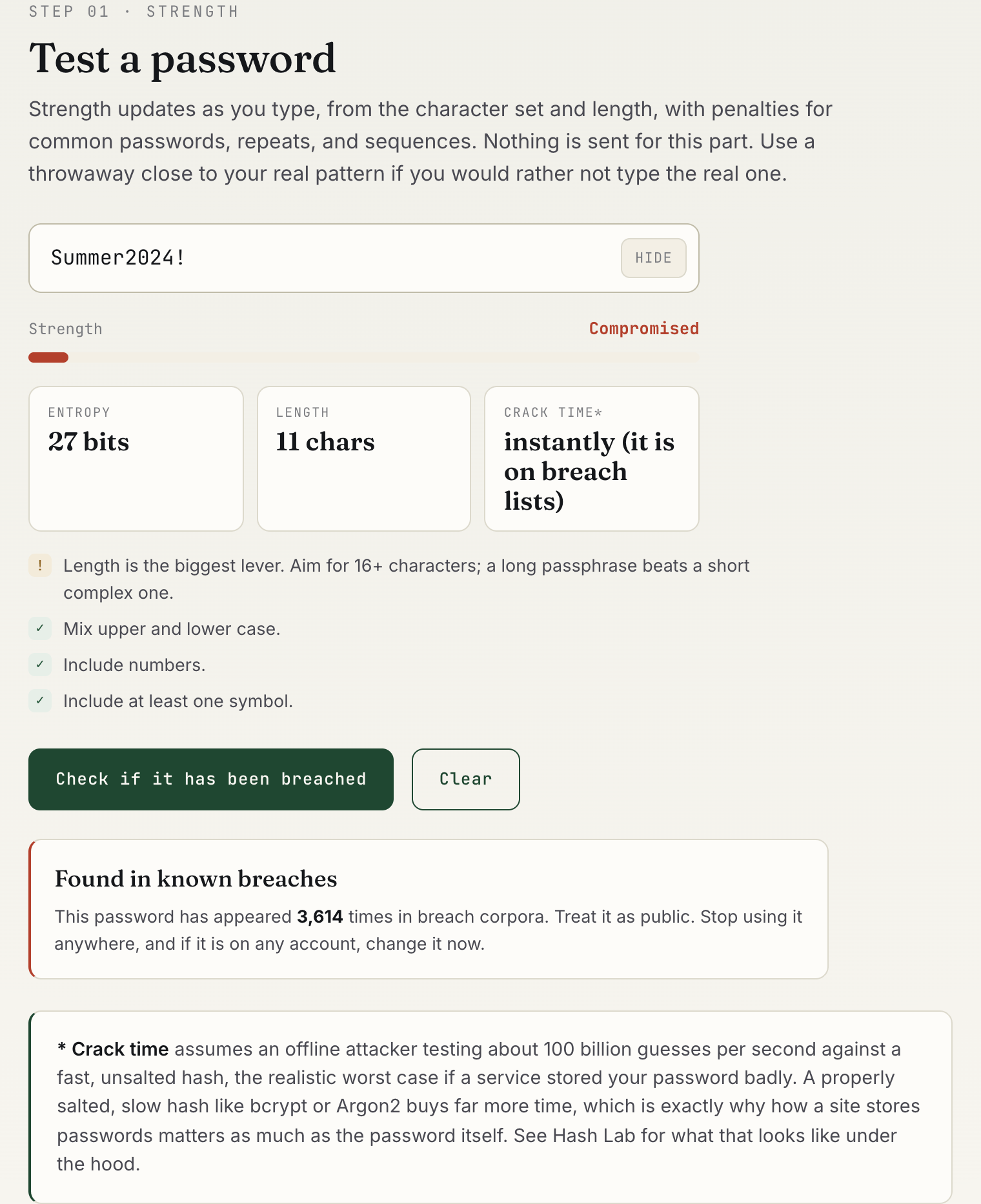
Summer2024! estimates at 27 bits. The breach check finds it 3,614 times, so the verdict reads "Compromised" and the crack time reads "instantly".That screenshot is the most useful lesson the tool teaches. Summer2024! ticks every composition box: upper case, lower case, digits, a symbol. The feedback list ticks them too. Yet the meter prices it at only 27 bits, because it reads a capitalised word, a year and a trailing symbol. Then the breach check finds it thousands of times, and the verdict becomes "Compromised". Composition rules would accept this password. An attacker would try it almost at once.
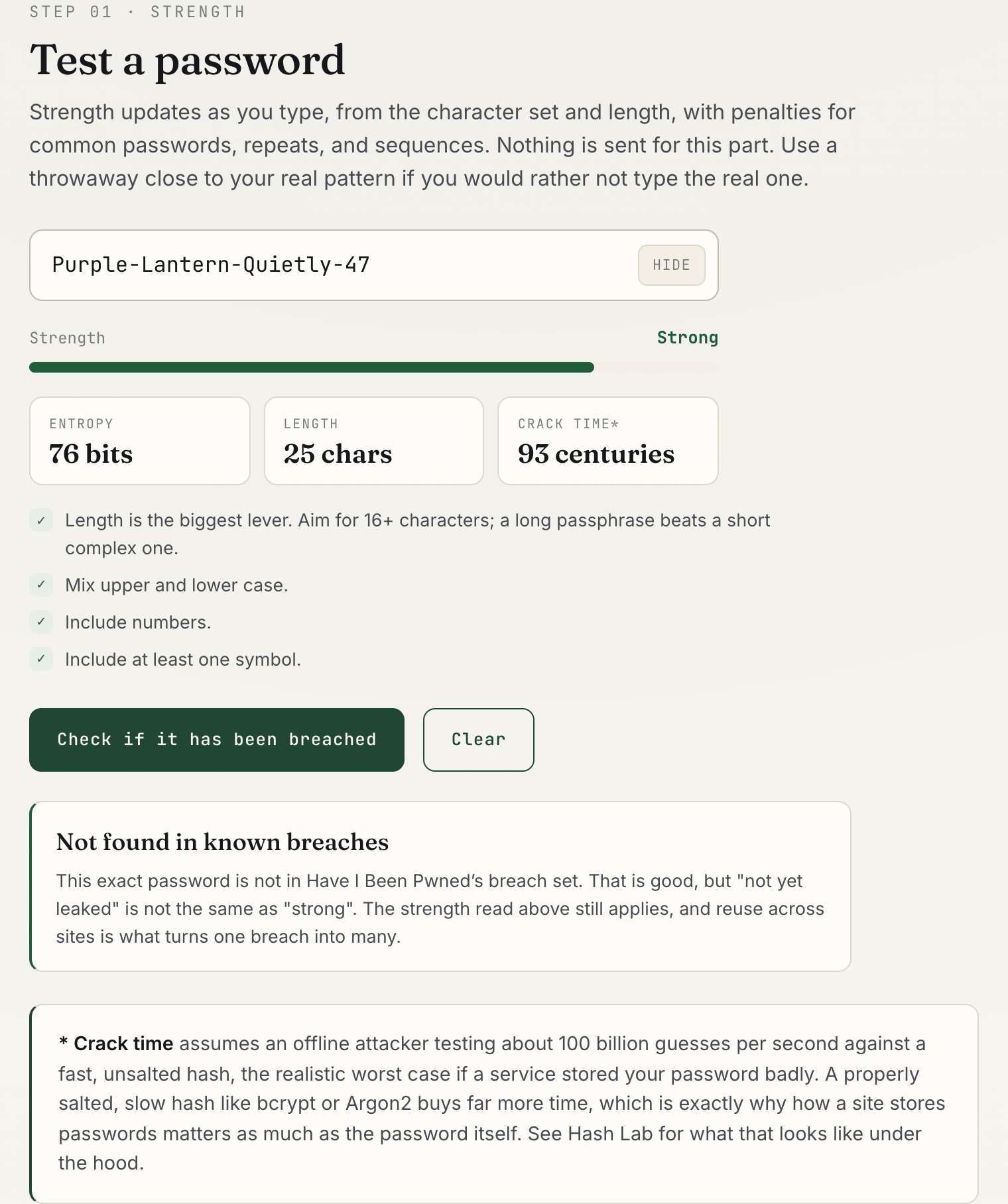
Purple-Lantern-Quietly-47What entropy and crack time actually mean
Entropy, measured in bits, is a way of counting how many guesses a password could take. Each extra bit doubles the search space. The tool works it out two ways and keeps the lower number. The first is the character-pool count: the length multiplied by log2 of the size of the character groups you used. The second prices the password the way a cracker's rules would. A run of letters counts as dictionary words, about 17 bits for every six letters or so, plus 1 bit for a leading capital. A 19xx or 20xx year counts about 7 bits, other digits 3.3 bits each, and each symbol 5 bits. The tool then trims the score for very common passwords, repeated characters, simple sequences, and an embedded year.
The crack-time figure assumes an offline attacker who has stolen a password database and can test about 100 billion guesses per second against a fast, unsalted hash. On average an attacker finds a password halfway through the search, so the tool divides half the search space by that rate. The page explains this assumption under the result, which I think is the right thing to do.
Here is the limit you need to understand. Pattern pricing makes the meter far more realistic, but it is still an estimate. Summer2024! is a season, a year and an exclamation mark, a pattern cracking tools try very early, so it lands at 27 bits. Purple-Lantern-Quietly-47 lands at 76 bits, well below what 25 random characters would give. A word-based attacker sees three words, two digits and some hyphens, and the tool prices it that way. What the meter cannot price is everything it does not model, such as names, leetspeak swaps or a phrase you have used before. And it cannot know whether your exact password has leaked. That is why a breach hit overrides it: the verdict becomes "Compromised" whatever the estimate said.
Fuller estimators exist. Dropbox's zxcvbn, described in a USENIX Security 2016 paper by Daniel Lowe Wheeler, matches passwords against real dictionaries, dates and keyboard patterns. This tool uses a lighter version of the same idea: it prices common shapes rather than looking each word up. So treat the meter as a rough guide, and treat the breach check as the hard evidence.
Storage matters as much as the password. A slow, salted hash such as bcrypt or Argon2 cuts guess rates by orders of magnitude compared with a fast unsalted hash. You cannot see how a given site stores your password, which is why the worst case is the honest assumption. Hash Lab shows how those algorithms behave if you want to see the difference for yourself.
What current NIST guidance says
The rules most people learned at work are outdated. SP 800-63B Revision 4 is direct about it. These rules are written for services that check passwords, but they tell you what a good password policy looks like:
- Length over complexity. A password used as the only factor must be at least 15 characters. One used as part of multi-factor authentication must be at least 8. Services should allow at least 64.
- No composition rules. Services "SHALL NOT impose other composition rules," such as requiring a mix of character types.
- No forced rotation. Services must not require periodic changes, but they must force a change when there is evidence of compromise.
- Screen against breached lists. New passwords are compared in full against a blocklist of common and compromised passwords.
- Allow password managers. Services "SHALL allow the use of password managers and autofill functionality" and should permit paste.
Read the tool's feedback list in that light. It still shows checkmarks for mixed case, numbers and symbols. Those are fine as hints for a site that demands them. But NIST's position is clear: length and a clean breach result matter far more than character variety.
If the check fails: generate a replacement
If the breach check finds your password, treat it as public. Change it on every account where you used it, starting with email, because email resets everything else. My earlier post on what to do when your password was in a data leak covers the order of operations.
Pick the replacement by how you will use it. For a password your manager will store and fill, use the secure password generator. It builds passwords from the browser's cryptographic random number generator via crypto.getRandomValues rather than Math.random and it uses rejection sampling so no character is more likely than another. Nothing is sent anywhere.
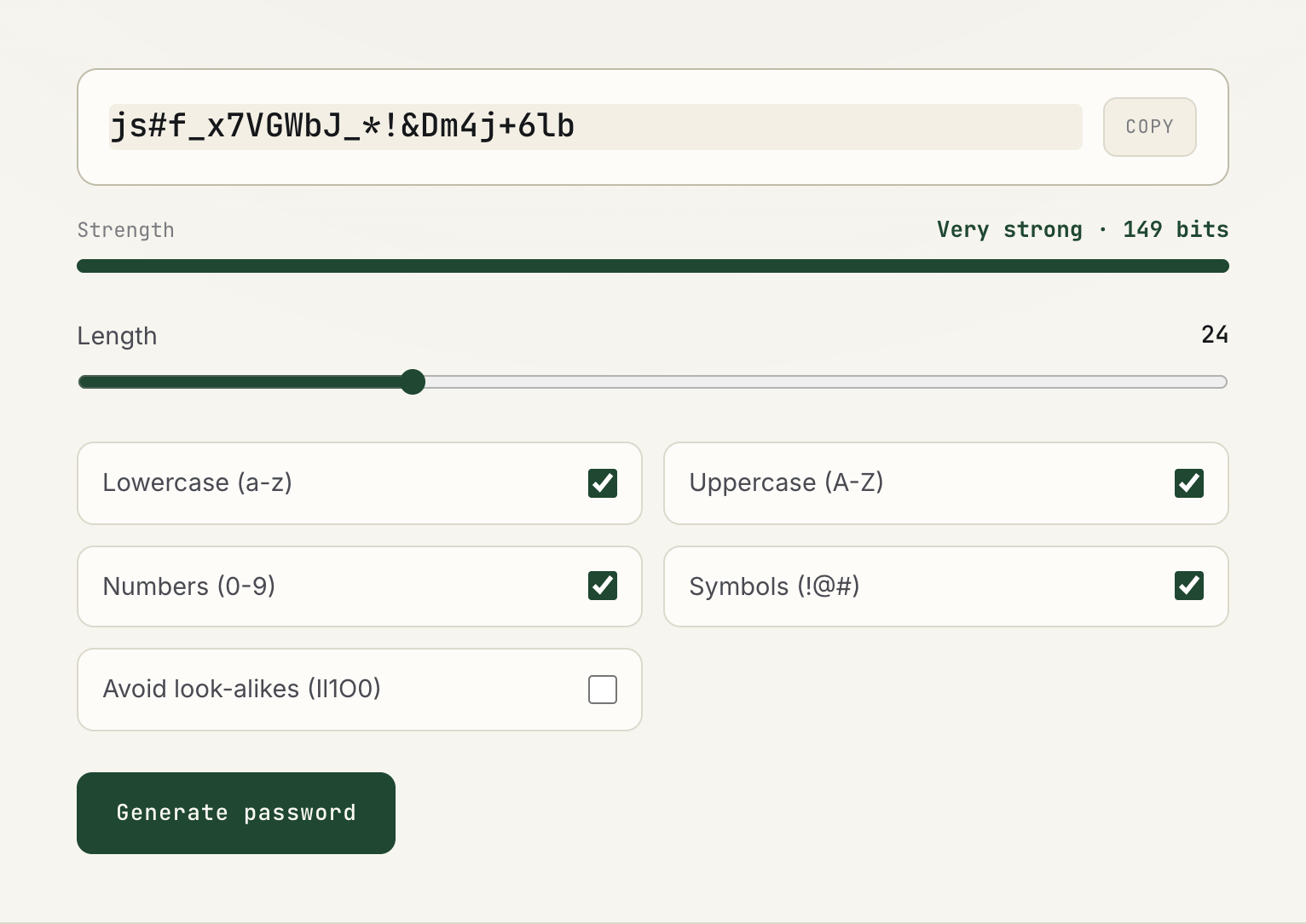
This is where entropy becomes trustworthy. A generated password really is random, so 24 characters drawn from 75 possible symbols really is about 149 bits. My settings advice:
- Use 20 characters or more for anything a password manager will fill for you. Length costs you nothing when you never type it.
- Turn on Avoid look-alikes for passwords you will read aloud or type by hand, such as a Wi-Fi key.
- Switch off symbols only if a site rejects them, and add length to compensate.
- For the one or two passwords you must memorize, such as your password manager's master password, a passphrase is easier to recall. The next section covers that case. I explain the words versus letters trade-off in whether words beat random letters.
For passwords you must memorize: the AI password generator
A few passwords never live in a password manager, because you type them from memory. Think of the manager's own master password, your laptop login, or your phone's device password. Random characters are a poor fit there. The AI password generator is an intelligent, AI-assisted generator built for exactly this case. It turns a theme you choose into a passphrase you can picture.
- Open the AI password generator and keep Memorable selected. It is one of three modes, alongside Random and PIN. Without a theme, it draws words from the EFF large wordlist of 7,776 words.
- Type a theme you like into the Theme field and click Use theme, or tap a chip such as "ocean", "jazz" or "hiking". AI builds a themed vocabulary in a second or two.
- Read the result line. It shows the strength in bits and the average time to guess offline at 100 billion guesses a second. The word count adjusts on its own to keep the passphrase above 60 bits.
- Press Copy to put it on your clipboard in one tap, then type it a few times so it sticks before you rely on it.
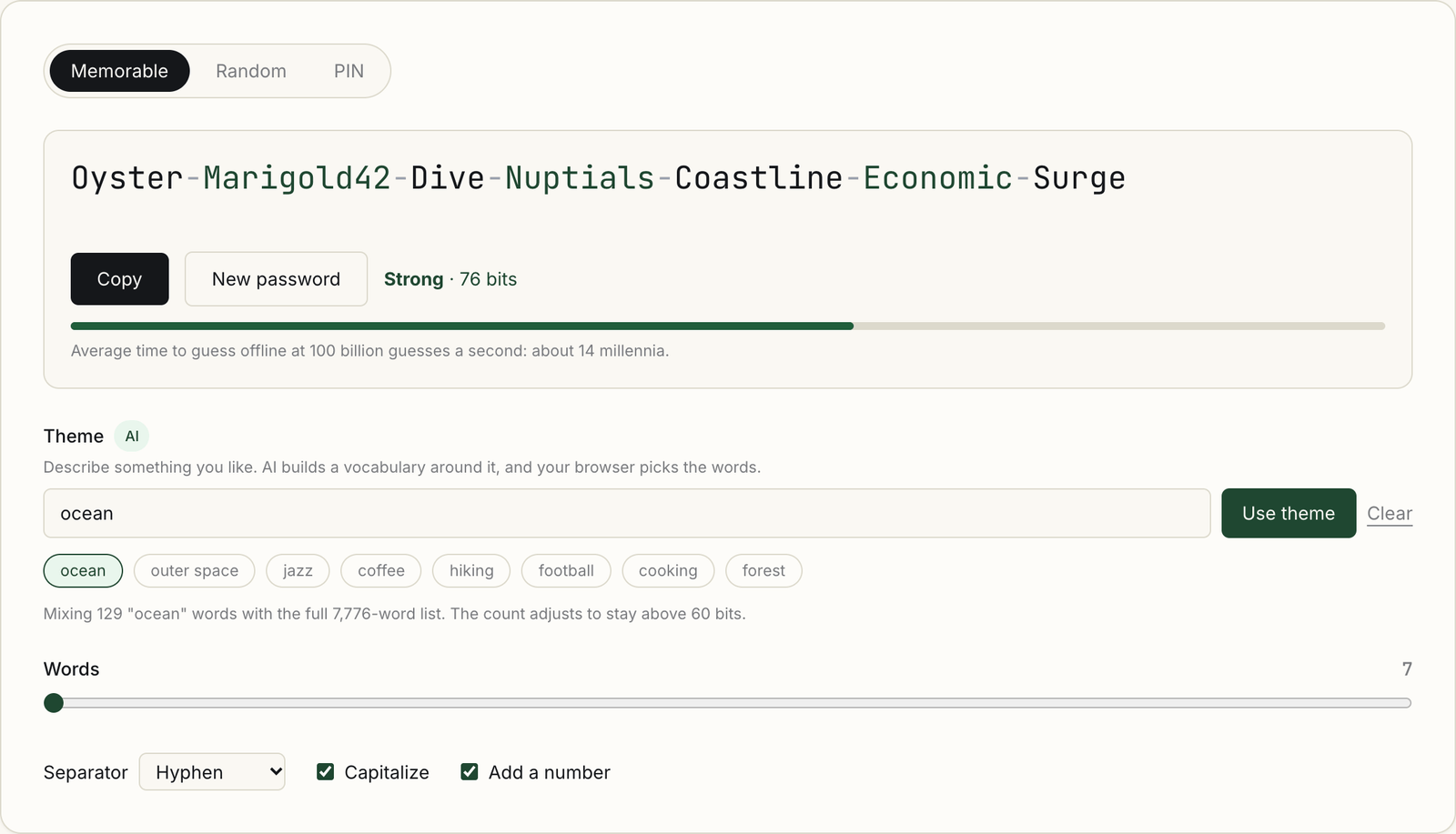
The theme is what makes it memorable. Theme words alternate with words from the EFF list, so every other word belongs to a subject you already know. A run like a sea creature, a random word, a coastline and another random word becomes a small scene. A scene is easier to recall than five unrelated words.
The split of work is what keeps it strong. AI chooses the vocabulary, and your browser chooses the words. The only thing sent to Cloudflare Workers AI is the theme text, and what comes back is a word list. Your browser then picks each word with crypto.getRandomValues, using rejection sampling so every word in a list is equally likely. The AI never sees the password, and the password never leaves your device.
The strength number is honest for the same reason. It is computed from how the password was generated, not from how it looks. A word drawn from 7,776 adds about 12.9 bits. A word drawn from a 129-word ocean vocabulary adds about 7 bits, and the tool counts it at that lower value. That is why a themed passphrase gets more words than a plain one. Unlike the meter in the breach check, this figure is exact, because every pick is random.
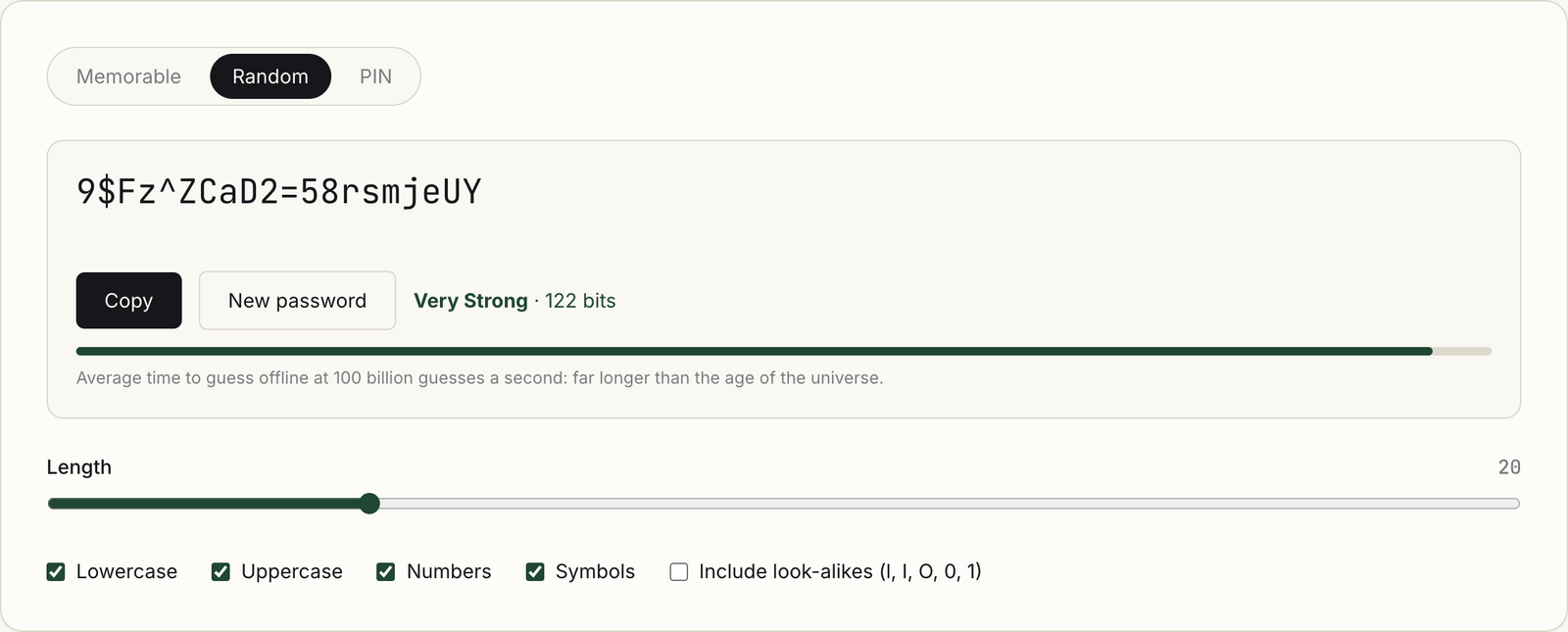
The same page also has a Random mode for passwords a manager will store, and a PIN mode for numeric codes. Either generator works for manager-stored passwords. Keep the themed passphrase for the handful you type by hand.
Whichever generator you use, run the new password through the breach check once. A freshly generated password should never appear there, and confirming it costs one click.
The real fix: a password manager, then passkeys
A generated password you cannot remember is useless without somewhere to keep it. That is the job of a password manager. It generates a unique password for every site, fills it in, and only offers it on the domain it belongs to. That last part quietly blocks a lot of phishing. Reuse is what turns one breached site into ten compromised accounts, and a manager removes reuse. I keep a current comparison of the top password managers on security, usability and value.
Passkeys go further. A passkey is a key pair: the private key stays on your device or in your password manager, and the site stores only the public key. There is no shared secret for a breach to leak and nothing for a fake login page to capture. Having spent years building customer identity at LoginRadius, my view is that passkeys are the first replacement that improves security and convenience together. The trade-offs are in my passkeys vs. passwords comparison.
So the order is simple. Check the password you have. Replace anything weak or breached with a generated one. Store it in a manager. Switch to a passkey wherever a site offers one, and add multi-factor authentication where it does not.
FAQ
Is it safe to type my real password into the breach check?
The tool hashes the password in your browser and sends only the first 5 characters of the SHA-1 hash to Have I Been Pwned. The password and full hash stay on your device. Even so, the safest habit is to test a throwaway that follows your real pattern, or to rely on the breach monitoring built into your password manager.
My password was not found. Does that mean it is safe?
No. "Not found" means that exact string is not in HIBP's breach set today. It says nothing about reuse, about a guessable pattern, or about breaches that have not surfaced yet. Use the strength estimate and common sense alongside it.
Why does a breach hit override the strength meter?
The meter estimates how hard a password is to guess from its length, character mix and the patterns crackers try first. It cannot know whether that exact password has leaked. When the breach check finds it, the tool marks it "Compromised" and the crack time reads "instantly", because a leaked password sits on every attacker's list.
Does the AI password generator send my password to an AI?
No. Only the theme you type, such as "ocean", goes to Cloudflare Workers AI, which returns a list of themed words. Your browser picks the words with crypto.getRandomValues and builds the passphrase on your device. Strength counts both word lists, and words are added to stay above 60 bits.
How long should a password be in 2026?
NIST SP 800-63B Revision 4 sets a minimum of 15 characters for a password used on its own, and 8 when it is one part of multi-factor authentication. For generated passwords stored in a manager, I use 20 or more, because length costs nothing there.
Should I still change my passwords every 90 days?
Not on a schedule. NIST says services must not force periodic changes, because rotation pushes people into predictable patterns like Summer2024! becoming Autumn2024!. Change a password when there is evidence it was exposed, such as a breach check hit.
More like this
All Identity & CIAM- Scams & CybersecurityWas Your Password in a Data Leak? What to Actually Do NextFinding out your password was in a data leak is unsettling, but panic is not the right response and neither is ignoring it. Here is…
- Identity & CIAMThe Future of Password Managers and How AI Will Change The GameThe future of passwords is looking brighter than ever. With the rise of cyber-attacks and data breaches, it's becoming more important to…
- Identity & CIAMThe Psychology of Security: Why Users Resist Better Authentication70% of Americans feel overwhelmed by passwords, yet only half choose secure ones despite knowing the risks.
Get new Identity & CIAM writing
Enjoyed this? Subscribe and tell us what you read most. Identity & CIAM is already ticked for you. No tracking pixels, unsubscribe with one click.