
Understanding CPUs, GPUs, NPUs, and TPUs: A Simple Guide to Processing Units
A CPU is the generalist, a GPU does thousands of calculations at once, an NPU runs AI on your device at low power, and a TPU is Google datacenter silicon.
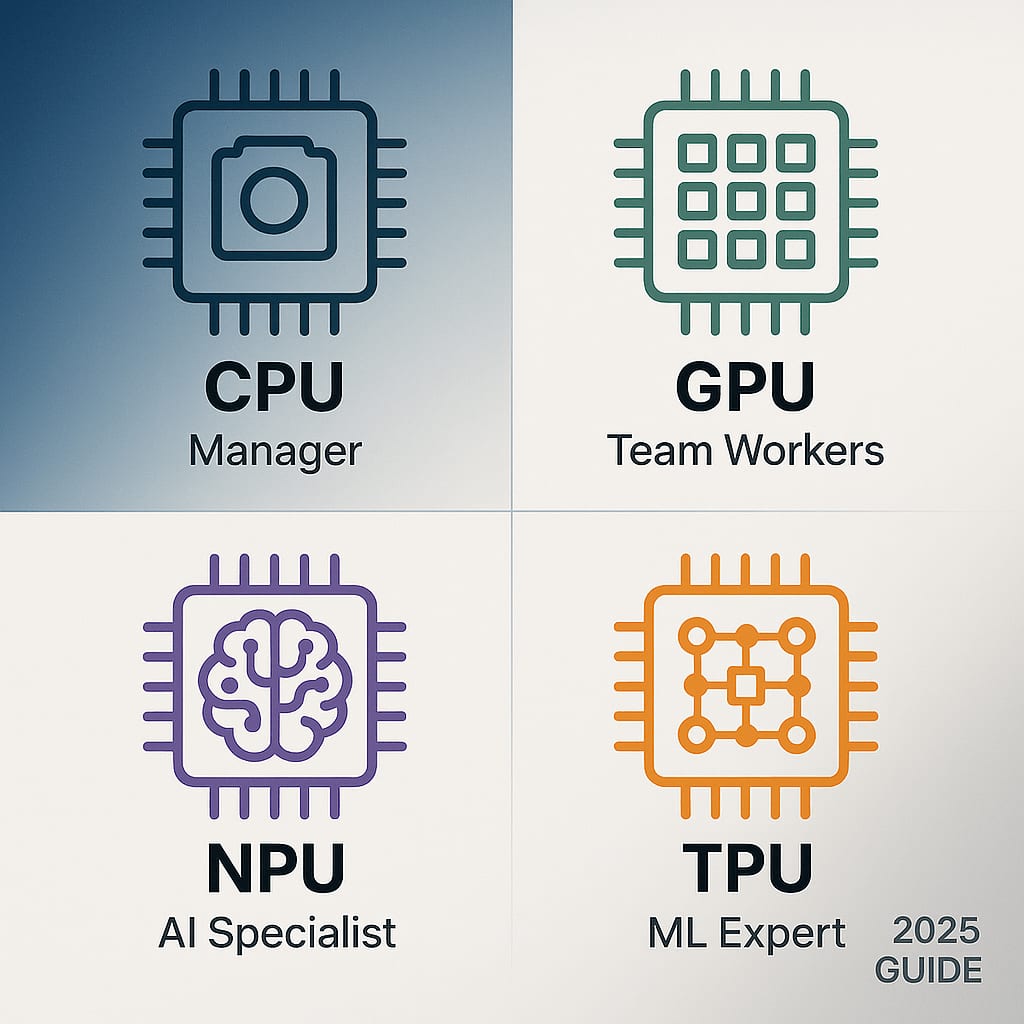
The short answer. A CPU is the generalist that runs your operating system and most software, a few powerful cores handling any instruction you throw at them. A GPU runs thousands of simple calculations at once, which is why it draws graphics and trains AI models. An NPU is a small, low-power accelerator built for the matrix math behind AI inference, so your laptop or phone can run AI features on battery. A TPU is Google's datacenter-scale accelerator for the same math, rented by the hour rather than bought in a box.
Your phone and laptop ship several of these on one piece of silicon, and the operating system hands each job to whichever unit runs it most cheaply. This page explains what each one is, how they differ, and which one matters when you are buying.
CPU vs GPU vs NPU vs TPU at a glance
Five dimensions decide which processor a workload belongs on: the kind of work it is good at, how it achieves parallelism, how it gets at memory, where it physically sits, and what it costs in power.
| CPU | GPU | NPU | TPU | |
|---|---|---|---|---|
| Good at | Serial, branchy work: operating systems, compilers, business software, control logic | Repeating one operation across a huge array: rendering, video encoding, AI training | Running an already-trained AI model on the device, continuously, on battery | Training and serving large AI models at datacenter scale |
| Parallelism | A few powerful cores with out-of-order execution and branch prediction | Thousands of lightweight cores executing the same instruction across different data | Fixed-function matrix engines with a dataflow pipeline, no general shader model | Systolic arrays inside TensorCores, scaled out across pods of thousands of chips |
| Memory | Latency-optimised: L1, L2, and L3 caches in front of system RAM | Bandwidth-optimised dedicated memory, or shared system memory when integrated | Shares the chip's unified memory with CPU and GPU, and is usually limited by it | High-bandwidth memory on the package: 192 GB at 7,380 GB/s per Ironwood chip |
| Where it lives | Every device, as the main processor | Integrated into the same chip as the CPU, or a separate card with its own cooling | A block on the phone or laptop chip, next to the CPU and GPU | Google datacenters, rented through Google Cloud |
| Typical power | Laptop packages in the tens of watts: Intel rates the Core Ultra X9 388H at 25 W base, 80 W maximum turbo | Up to 575 W for a desktop flagship like the GeForce RTX 5090; far less when integrated | Not published separately by vendors. Designed to run inside a battery-powered budget indefinitely | Rack-scale and liquid-cooled. Not a consumer component |
Sources for the figures in that table: Intel product specifications for the Core Ultra X9 388H, NVIDIA GeForce RTX 5090 specifications, and Google Cloud TPU7x documentation.
What a CPU is
A Central Processing Unit is the general-purpose processor that runs your operating system and nearly all of your software. It is the only unit here that can do everything, which is exactly why it is not the fastest at any one thing.
A CPU has a small number of powerful cores, typically 2 to 24 in a laptop and up to 128 or more in a server. Intel's Core Ultra X9 388H, for example, carries 16 cores: 4 performance cores, 8 efficient cores, and 4 low-power efficient cores. Each core is built for low latency rather than throughput. It predicts branches, reorders instructions, and keeps several operations in flight so that unpredictable code still runs quickly.
Memory is where a CPU spends most of its engineering budget. Cache sits between the cores and main memory in layers labelled L1, L2, and L3, with L1 the smallest and fastest. The gap between cache and main memory is wider than most people expect, and it is why cache size appears on every spec sheet. What CPU cache is, and how L1, L2, and L3 differ covers that properly.
CPUs struggle when a job means doing the same arithmetic millions of times. That is the GPU's job.
What a GPU is
A Graphics Processing Unit is a processor built to run thousands of simple calculations simultaneously. Where a CPU has a handful of expert cores, a GPU has thousands of simple ones running the same instruction across different pieces of data.
That design came from graphics. Every pixel on a screen can be computed independently, so a chip that computes thousands of pixels at once draws frames far faster than one that computes them in sequence. Researchers then noticed that neural network training is the same shape of problem: enormous numbers of independent multiply-and-add operations. Modern GPUs now carry dedicated matrix hardware for exactly that. NVIDIA rates a single Rubin GPU at 50 petaflops of NVFP4 compute.
GPUs come in two forms, and the difference matters when you are buying:
- Integrated. Built into the same chip as the CPU and sharing system memory. Lower power, fine for everyday work, light gaming, and video playback.
- Discrete. A separate board with its own memory and cooling. The GeForce RTX 5090 carries 32 GB of GDDR7 on a 512-bit bus and is rated at 575 W. That memory bandwidth is the reason a discrete card is so much faster on large models and high-resolution rendering.
CPU vs GPU: which does what
This is the comparison people actually ask about, so here it is directly. A CPU is faster at any one task taken alone. A GPU is faster at doing the same task ten thousand times at once. Neither replaces the other, and every machine that has both uses both constantly.
Put it on the CPU when the work is serial, full of branches and decisions, or touches many different kinds of data. Booting an operating system, compiling code, running a database query planner, executing business logic, and handling input all belong here. The work depends on the result of the previous step, so having thousands of cores would not help.
Put it on the GPU when the work is the same operation repeated across a large array with no dependency between the items. Rendering a frame, encoding video, simulating physics, training a neural network, and running a large model's forward pass all belong here.
The handoff costs something. Data has to move from system memory to the GPU and back, and on a discrete card that crossing takes real time. A job that is large and parallel wins easily. A job that is small and parallel is often faster on the CPU, because the transfer costs more than the computation saves.
A worked example. When you export a video, the CPU reads the project file, decides the order of operations, and manages the file system. The GPU does the actual per-frame encoding. When you run a web browser, the CPU runs JavaScript and page layout while the GPU composites and paints what you see. Neither unit is idle, and neither could do the other's job well.
One myth worth retiring: a GPU is not simply a faster CPU. Clock for clock, a single GPU core is slower and far less capable than a CPU core. Its advantage is entirely in numbers.
What an NPU is
An NPU, or Neural Processing Unit, is a processor built to run the low-precision matrix and tensor math behind neural network inference, using far less energy than a CPU or GPU would for the same work.
What it is for. Running an already-trained AI model on your own device: speech recognition, camera processing, background blur, face unlock, live translation, small language models, and semantic search over your own files.
What it is not. It is not a small GPU. It has no graphics pipeline and no general-purpose programming model. It is also not a training chip. Training still happens on GPUs and datacenter accelerators.
How it differs from a CPU and a GPU. A CPU handles any instruction and is the least efficient of the three at sustained AI math. A GPU is the fastest and the hungriest. An NPU gives up flexibility and peak speed to get energy per inference low enough that a feature can stay on all day without flattening the battery.
Every current phone and premium laptop chip has one. Microsoft requires an NPU rated above 40 trillion operations per second for a Windows machine to carry the Copilot+ PC badge, plus 16 GB of RAM and 256 GB of storage. That is a labelling rule for a specific feature set, not the point at which on-device AI starts working.
That is the short version. Read the full NPU reference for the architecture, what the TOPS number does and does not tell you, how to target an NPU as a developer, and the 2026 vendor figures. That page answers "what exactly is an NPU and which chip should I care about." This page answers "what do all four of these units do, and which one runs my work."
What a TPU is
A Tensor Processing Unit is Google's own family of AI accelerators, built for datacenter training and inference rather than for consumer devices. You do not buy one. You rent it through Google Cloud, or you use it indirectly every time you use a Google service.
TPUs are built around systolic arrays, a layout that streams data through a grid of multiply-accumulate units so that intermediate results move directly between neighbours instead of going back to memory. That removes one of the bottlenecks that slows general-purpose processors on this kind of math.
The current generation is the seventh, codenamed Ironwood and sold as TPU7x. Per Google's own documentation, each chip delivers 4,614 teraflops of peak FP8 compute and 2,307 teraflops at BF16, carries 192 GB of high-bandwidth memory at 7,380 GB/s, and contains two TensorCores and four SparseCores. A single pod links 9,216 chips.
One detail has changed and is worth flagging, because older guides still say the opposite. TPUs no longer centre on TensorFlow. Google's documentation for TPU7x states plainly that JAX and PyTorch are supported and TensorFlow is not.
Google also ships a related Tensor chip in Pixel phones, which is a mobile SoC rather than a datacenter TPU. Google says the Tensor G6 in the Pixel 11 has 50% more TPU compute and runs on-device AI up to 3.5 times faster while using up to 3.5 times less energy.
Why your devices ship several of these
The trade-off is flexibility against efficiency. A general-purpose processor can run anything and is optimal for nothing. A specialised processor gives up generality and gets back speed, power efficiency, or both.
A Swiss Army knife opens bottles, cuts rope, and turns screws. You would still not build a house with one. The same logic put four different processors on one chip: each job goes to the unit that runs it for the least energy.
A single video call on a modern laptop uses three of them at once. The NPU runs background blur and noise suppression, the GPU runs the video codec, and the CPU runs the application and the network stack. None of that is visible to you, and none of it requires a decision on your part.
What changed in 2026
Four shifts are worth knowing if you last read about this a year or two ago.
Consumer NPU ratings roughly doubled. Qualcomm's Snapdragon X2 Elite and X2 Elite Extreme carry an 80 TOPS Hexagon NPU. AMD's Ryzen AI 400 series reaches up to 60 NPU TOPS on mobile parts and brought Copilot+ to a socketed desktop processor for the first time. Intel's Core Ultra series 3 launched on 5 January 2026 as the first client platform on the Intel 18A process, with up to 50 NPU TOPS. The 40-TOPS Copilot+ floor is now the entry point rather than the ceiling.
Apple stopped quoting NPU numbers and spread AI compute across the chip. The last Neural Engine figure Apple published was 38 trillion operations per second on M4. Since M5 it has put a Neural Accelerator in every GPU core instead. The M6 and M5 Ultra were announced in August 2026. M6 pairs a dual 16-core Neural Engine with a 12-core GPU. M5 Ultra has a 32-core Neural Engine, up to 80 GPU cores, and 1.2TB/s of unified memory bandwidth. The A20 Pro in the iPhone 18 Pro carries a dual 16-core Neural Engine built on a 2nm process, with Neural Accelerators in the CPU cores as well.
Memory bandwidth became the number that matters. Compute has outrun bandwidth on device for several generations. Apple's own progression shows the direction: 153GB/s on M5, up to 170GB/s on M6, 1.2TB/s on M5 Ultra. Bandwidth is what decides how large a language model runs usefully on a laptop, not the TOPS rating.
Datacenter silicon moved again. NVIDIA introduced the Rubin platform as the successor to Blackwell, with the Vera Rubin NVL72 rack combining 72 Rubin GPUs and 36 Vera CPUs. AMD launched the Instinct MI400 series with its Helios rack-scale design. Google made Ironwood generally available. The MI400 series replaces the MI300 generation that earlier versions of this page described.
Which one do you actually need
- Web, documents, email, video. Any modern CPU with integrated graphics. Single-core performance and memory capacity matter more than anything else here.
- Gaming, video editing, 3D. A discrete GPU. Video memory size and memory bandwidth decide how large a project you can handle.
- Running AI models locally for development. A GPU still wins, because of memory capacity and framework support. An NPU is for deployed features, not for iterating on models.
- On-device AI features with good battery life. An NPU, which on Windows means a Copilot+ machine and on Mac or iPhone means any recent chip. Check memory bandwidth as well as the TOPS number.
- Training or serving a large model. Rent it. Cloud GPUs or TPUs give you access to hardware that costs more than a car, priced by the hour.
For anyone buying a laptop specifically for AI work, the two specifications that predict real performance are unified memory capacity and memory bandwidth. A high TOPS rating on a machine with slow memory will disappoint you.
How this page was verified
Last verified: September 2026. Every figure on this page comes from the company that makes the part. Sources checked: Intel product specifications, NVIDIA product and newsroom pages, AMD and Apple newsroom releases, Qualcomm press releases, Microsoft Learn, the Windows 11 system requirements page, and Google Cloud documentation. Where a vendor does not publish a number, such as standalone NPU power draw or Apple's current Neural Engine TOPS, this page says so rather than repeating a third-party estimate. Claims about earlier generations that vendors have since superseded, including the TensorFlow-first framing of TPUs and the MI300 generation of AMD accelerators, have been replaced.
Frequently Asked Questions
What does CPU stand for?
Central Processing Unit. It is the general-purpose processor that runs your operating system and most of your software. Every computer has one. It handles any kind of instruction rather than specialising in one kind of math, which makes it flexible and comparatively inefficient at repetitive work.
What does GPU stand for?
Graphics Processing Unit. It was built to draw images by computing many pixels at once, and that same parallel design turned out to suit machine learning, video encoding, and scientific computing just as well. A GPU core is individually slower than a CPU core. Its advantage is that there are thousands of them.
CPU vs GPU: which does what?
A CPU runs serial, branchy work: operating systems, compilers, business logic, anything where each step depends on the last. A GPU runs the same operation across a large array at once: rendering, video encoding, AI training and inference. A CPU is faster at any single task. A GPU is faster at doing one task thousands of times simultaneously. Real systems use both at the same time.
What does NPU mean?
NPU stands for Neural Processing Unit. It is a processor built to run the low-precision matrix and tensor math behind neural network inference, using far less energy than a CPU or GPU would for the same job. It is the block in a phone or laptop chip that handles AI features on the device rather than in the cloud.
What is an NPU processor?
It is the AI accelerator built into a modern phone, laptop, or edge chip. It runs already-trained models locally: speech recognition, camera processing, background blur, face unlock, live translation, and small language models. It is not a small GPU, and it does not train models. The NPU reference page covers the architecture and the current vendor figures.
What is the difference between an NPU and a TPU?
Scale and setting. NPU is the general term for an on-device AI accelerator, the kind built into a phone or laptop chip. TPU is Google's specific family of AI accelerators, designed for datacenter training and inference and rented through Google Cloud. Both exist to make neural network math cheaper than it would be on a CPU or GPU.
Do I need a laptop with an NPU?
Only if you want on-device AI features that run without draining the battery. An NPU does not make ordinary work faster. Microsoft's Copilot+ badge requires an NPU rated above 40 TOPS, which is a labelling threshold for a feature set rather than a line where hardware becomes capable. Leading 2026 chips clear it by a wide margin.
Which processor is the most powerful?
It depends entirely on the work. For raw AI throughput, datacenter parts win: NVIDIA rates a Rubin GPU at 50 petaflops of NVFP4, and a Google Ironwood TPU chip at 4,614 teraflops of FP8. For running your operating system, a laptop CPU beats both, because neither is designed to do that at all. "Most powerful" is only meaningful once you name the job.
What is CPU cache?
A small pool of very fast memory between the processor cores and main memory, arranged in levels: L1 is smallest and fastest, then L2, then a larger shared L3. It exists because main memory is far slower than the cores reading from it. See the full explanation of L1, L2, and L3 cache.
More like this
All AI Security & Agents- AI Security & AgentsWhat Is CPU Cache? L1, L2, and L3 ExplainedCPU cache is the fast memory between the cores and main memory. What L1, L2, and L3 each do, why cache lines are 64 bytes, and when more…
- AI Security & AgentsMCP for Technical Professionals: A Comprehensive Guide to Understanding and Implementing the Model Context ProtocolA deep dive into architecture, security, and practical implementation for developers who want to truly understand MCP
- AI Security & AgentsComplete Guide to AI Tokens: Understanding, Optimization, and Cost ManagementDiscover how to effectively manage and optimize AI tokens for better performance and cost efficiency.
Get new AI Security & Agents writing
Enjoyed this? Subscribe and tell us what you read most. AI Security & Agents is already ticked for you. No tracking pixels, unsubscribe with one click.