
WebAuthn Explained: How Passkeys Work Under the Hood
Updated · 11 min read · By Deepak Gupta
On this page
Key takeaways
- WebAuthn is the W3C browser API; passkey is the user-facing name for synced WebAuthn credentials.
- Registration creates an asymmetric keypair scoped to the relying party's origin (RP-ID); the private key never leaves the authenticator.
- Authentication is a signature over a server-issued challenge, phishing-resistant by construction.
- RP-ID misconfiguration across subdomains is the most common deployment mistake; use the apex domain consistently.
- Conditional UI (mediation: 'conditional') surfaces existing passkeys in autofill and is the single largest adoption lever.
What WebAuthn is
The protocol pre-dates the passkey brand by years (WebAuthn Level 1 was a W3C Recommendation in 2019; "passkey" entered consumer marketing in 2022). What changed in 2022–2024 was not the protocol but the user-facing model: cloud password managers started syncing WebAuthn credentials across devices, which removed the "I lost my key" objection that had limited adoption.
How registration works
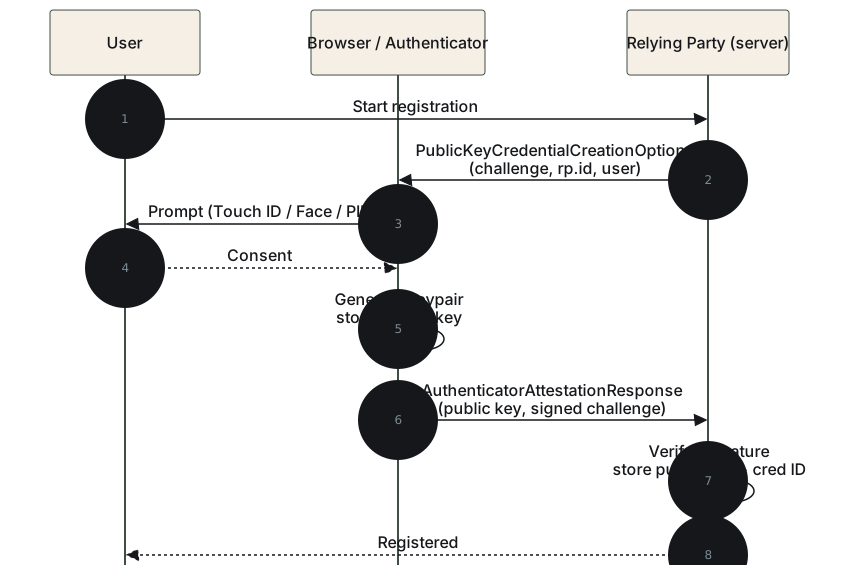
The registration flow creates a new asymmetric keypair on the user's authenticator and returns the public key to the server. The private key stays on the authenticator forever, the server never sees it, never stores it, never transmits it.
1. Server generates a registration challenge (random 16+ byte nonce).
2. Server sends { rp: { id: "example.com" }, user: { ... }, challenge,
   pubKeyCredParams: [...] } to the browser.
3. Browser invokes navigator.credentials.create() → authenticator
   prompts user (Face ID, Touch ID, PIN, security key tap).
4. Authenticator generates a new keypair scoped to RP-ID + user.
5. Authenticator returns { publicKey, credentialId, clientDataJSON,
   attestationObject } to the browser.
6. Browser passes the response back to the server.
7. Server verifies the attestation, stores publicKey + credentialId
   against the user record.
The server-side validation is the part most CIAM vendors handle for you: verifying the clientDataJSON matches the challenge it issued, parsing the attestationObject, checking the authenticator's signature, and storing the credential.
How authentication works
1. Server generates an authentication challenge (random nonce).
2. Server sends { rpId: "example.com", challenge, allowCredentials: [...] }
   to the browser. allowCredentials may be empty for "discoverable"
   credentials (passkeys).
3. Browser invokes navigator.credentials.get() → authenticator prompts
   user (or autofills with conditional UI).
4. Authenticator signs the challenge with the private key.
5. Browser returns { credentialId, clientDataJSON, signature,
   authenticatorData } to the server.
6. Server verifies the signature with the stored public key, checks the
   challenge matches, verifies origin and rpId, asserts credentialId
   matches the user.
The phishing resistance falls out of step 5: the signature covers the origin the browser saw, so an attacker proxy at attacker.com cannot forge a signature for example.com even if the user types their passkey prompt at attacker.com. The browser will refuse to invoke the authenticator at all if the origins don't match.
RP-ID configuration: where deployments break
The single most common WebAuthn deployment mistake is RP-ID misconfiguration across subdomains. The rule:
- RP-ID must be a registrable domain or a subdomain thereof.
- A credential registered at RP-ID
example.comcan be used atexample.com,app.example.com,auth.example.com, etc. - A credential registered at RP-ID
app.example.comcan only be used atapp.example.com(and deeper subdomains), not at the apex or sibling subdomains.
The implication: set RP-ID to the apex domain unless you have a specific reason to scope tighter. Teams that set RP-ID to auth.example.com discover months later that their app has migrated to app.example.com and the passkeys don't work.
For multi-tenant SaaS where each tenant runs at tenant.app.example.com, set RP-ID to app.example.com so credentials work across tenants.
Conditional UI: the adoption lever
The single largest factor in passkey adoption rates, bigger than UX polish, bigger than recovery flow design, is whether the deployment uses conditional UI.
Conditional UI is mediation: "conditional" on the navigator.credentials.get() call. Instead of an explicit "sign in with passkey" button that the user has to discover and click, conditional UI surfaces existing passkeys in the browser's autofill UI alongside saved usernames. The user clicks the autofill suggestion and is signed in.
Without conditional UI, the user has to know to click the "passkey" button and choose to use it. With conditional UI, passkey use becomes the default path because it's the most convenient autofill option.
Stytch, Clerk, Hanko, and Corbado ship conditional UI as the default. Auth0 and Cognito support it but require explicit opt-in. The difference shows up as a 5x to 10x gap in passkey adoption rates among customer deployments.
Attestation: usually skip it
Attestation is the optional WebAuthn feature that lets a relying party verify which authenticator created a credential, the make and model of the security key or the OS-level passkey provider. It's useful in narrow scenarios (regulated workforce auth where only enterprise-issued YubiKeys are acceptable) and harmful for most consumer deployments (it leaks platform information and reduces user choice).
The default in 2026 is attestation: "none", accept whatever authenticator the user prefers, validate the credential structure but not the authenticator's identity. Reach for direct attestation only when there's a regulatory or policy reason.
Implementation paths
For most teams the question isn't "implement WebAuthn from scratch", it's "which CIAM ships a competent WebAuthn implementation with conditional UI on by default."
The vendors with the strongest 2026 WebAuthn implementations: Stytch, Hanko, Corbado, Descope (full platforms with strong orchestration); Clerk, Auth0 (mid-tier with conditional UI opt-in or default); MojoAuth (passwordless-first with native passkeys behind a single API); Authsignal, Beyond Identity (orchestration / hardware-attested layers). For self-hosted, Hanko ships the cleanest passkey-first implementation; Keycloak and FusionAuth support WebAuthn but require theming work for adoption.
Related guides
Passwordless Authentication: A 2026 Practitioner's Guide
How passkeys, magic links, and biometrics replace passwords in CIAM, with implementation patterns, adoption data, and vendor support.
Multi-Factor Authentication (MFA): A 2026 Practitioner's Guide
How to roll out MFA in CIAM in 2026: factor selection, adoption, recovery design, anti-patterns, and where SMS OTP no longer meets the standard.
WebAuthn Level 3: What CIAM Teams Should Ship
WebAuthn Level 3 was proposed as a W3C Recommendation on 20 July 2026. PRF, related origins, Signal API, and conditional create change the CIAM passkey checklist.
Passkey Orchestration Ranking 2026: Who Actually Gets Adoption
WebAuthn support is table stakes. Orchestration is not. A 2026 ranking of which CIAM vendors get passkey adoption above a 5–10% stall.
Related vendors
Auth0
Auth0 remains the safest mid-market default for B2C plus B2B Enterprise SSO when developer velocity matters more than long-run TCO. Auth0 for AI Agents (GA November 2025) and Auth for MCP (GA May 2026) make it the first major CIAM with a packaged agent-identity surface. Below 50k MAU it is still hard to beat. Above 500k MAU, cost and Actions-driven lock-in make FusionAuth, Cognito, or Stytch (Twilio) plus a passkey orchestrator the more honest shortlist.
Clerk
Clerk is the default for native Next.js and Node.js apps under 100k MAU. Drop-in UI is the win. It is not an enterprise CIAM: federation long tail, Java/.NET, FedRAMP, and ISO 27001 are missing or thin. Do not put Clerk on an RFP that needs the rest of the enterprise stack. For that job use Auth0, WorkOS, or SSOJet. For passwordless-native, use MojoAuth or Stytch.
Corbado
Corbado is the deepest passkey-specialist orchestration layer in 2026, focused exclusively on driving passkey adoption on top of any underlying CIAM, with adoption analytics, A/B testing, and recovery-flow tooling that no full-platform vendor ships. For teams running Auth0 / Cognito / Keycloak who want to fix passkey adoption without changing primary CIAM, Corbado is the singular pick alongside Authsignal. Not a full CIAM, pick one of those first if greenfield.
Hanko
Hanko is the open-source passkey-first CIAM in 2026. Orchestration quality sits with Stytch and MojoAuth, not with Descope. Descope is a journey builder. Hanko is a passkey product with AGPL self-host and EU residency by default. Use it when adoption is the goal and B2B Enterprise SSO is not. For B2B SaaS or FedRAMP-shaped workloads, the narrow scope shows.
MojoAuth
MojoAuth is a growing passwordless-native CIAM. Passkeys, magic links, and OTP are the product, not Flow blocks. Published MAU pricing scales through enterprise volume (free tier through a declining per-MAU table into the millions) without Auth0's invoice shape. Put it on the 2026 shortlist next to Stytch for passkeys, not next to Descope. Descope is orchestration. MojoAuth is passwordless. Community and FedRAMP still trail Auth0.
Stytch
Stytch is the strongest passkey-first CIAM in 2026 by orchestration quality, not raw feature count. Twilio acquired it on October 30, 2025; the product runs as a Twilio subsidiary with its own API surface, SDK family, and pricing, distinct from Twilio Verify. Post-acquisition the platform combines Stytch's modern auth with Twilio's communications infrastructure, repositioning it as a credible Auth0 alternative for developer-focused teams. Below 500k MAU the case is strong for both B2C and B2B SaaS; beyond that, gaps on FedRAMP, FGA, and adaptive MFA depth narrow it.
Where to next
FAQ
- What's the difference between WebAuthn and passkeys?
- WebAuthn is the W3C standard browser API for public-key authentication. Passkey is the user-facing brand name for the WebAuthn credentials that sync across a user's devices via cloud password managers (iCloud Keychain, Google Password Manager, 1Password). Every passkey is a WebAuthn credential; not every WebAuthn credential is a passkey (FIDO2 hardware keys are device-bound WebAuthn credentials, not passkeys).
- Why is WebAuthn phishing-resistant?
- The credential is bound to the relying party's origin (RP-ID) by the browser. An adversary-in-the-middle proxy at attacker.com cannot complete a WebAuthn assertion for example.com because the browser refuses to sign for a mismatched origin. This is the structural property that defeats the AitM-proxy attacks defeating SMS OTP and push MFA.
- Does WebAuthn require HTTPS?
- Yes, WebAuthn calls only succeed in secure contexts (HTTPS, or localhost during development). The HTTPS requirement is part of the origin-binding security model.
- Why does my passkey work on apex.example.com but not on app.example.com?
- Because RP-ID was set to app.example.com instead of example.com. Always set RP-ID to the apex domain (example.com); the browser allows passkeys registered at the apex to be used by any subdomain that asserts the same RP-ID. Setting RP-ID to a specific subdomain restricts the credential to that subdomain only.
Sources
- W3C WebAuthn Level 3 specification
- FIDO Alliance Specifications Overview
- Web Authentication Methods MDN reference
- Corbado WebAuthn deployment data 2026